
Want to make music without a studio, expensive gear, or years of practice? Whether you’re a content creator looking for royalty-free BGM or a songwriter turning lyrics into a full track, AI music generators now offer an instant way to bring your vision to life.
But not all tools deliver the same results. Some create robotic melodies that trigger copyright issues, while others lack the customization needed for real creative work.
After over 100 hours of testing, we selected the 8 best AI music generators, evaluating them on music quality, vocal realism, customization, licensing transparency, and ease of use. Our top pick is Somio AI music maker, which combines expressive AI vocals, a dedicated BGM engine, reference-based music generation, smart prompt optimization, and a complete suite of audio editing tools to turn ideas into studio-quality tracks in seconds.
In this guide, you'll discover the best AI music makers that are powerful, easy to use, and beginner-friendly. Let’s dive in.
How to Choose the Best AI Music Generator?
The demand for high-quality audio has never been higher. Creators need royalty-free music to avoid copyright strikes on platforms like YouTube and TikTok, while musicians want faster ways to turn ideas into finished tracks. AI music generators can help — but not all tools deliver the same quality.
After testing dozens of platforms, we evaluated them based on five key factors:
High-fidelity audio output. Music should sound clean and natural, not robotic.
Customization and control. The ability to adjust mood, genre, tempo, lyrics, and vocals.
Ease of use and support. Intuitive interfaces that help beginners get great results quickly.
Commercial licensing. Clear royalty-free terms so you can publish and monetize safely.
Versatility and features. Tools that support full songs, acapellas, and reference-guided tracks, along with a dedicated AI background music generator to create instrumental tracks.
Prompting and Control. Getting the best results often comes down to effective prompting. Platforms that provide a dedicated AI music prompt guide help creators easily master genre tags, moods, and vocal styles for reliable, studio-quality output.
With these criteria in mind, here are the best AI music generators worth trying today.
At a Glance: Top 8 Al Music Generators Comparison
| Tool | Key Features | Free Trial |
|---|---|---|
| Somio | Studio-quality audio with realistic vocals, smart prompt optimization, full commercial license for every track | Yes |
| Suno | Text-to-song generation, expressive AI vocals, Suno Studio multitrack editing | Yes |
| Udio | High-quality AI singing, intuitive "remix" features | Yes |
| Mureka | Voice cloning, personalized AI model training, multi-modal input (text, melody, links) | Yes |
| Soundraw | Mood-based instrumental customization, powerful song structure editor | Limited |
| ElevenLabs | Ultra-realistic AI vocals, simple text-to-song creation | Limited |
| Beatoven.ai | Emotion-based BGM for videos, loop-friendly tracks | Yes |
| AIVA | Orchestral & cinematic specialist, MIDI & stems export, 250+ music styles | Yes |
Best 8 Dedicated AI Music Makers
Somio - Best for Studio-Quality Songs from AI Prompts
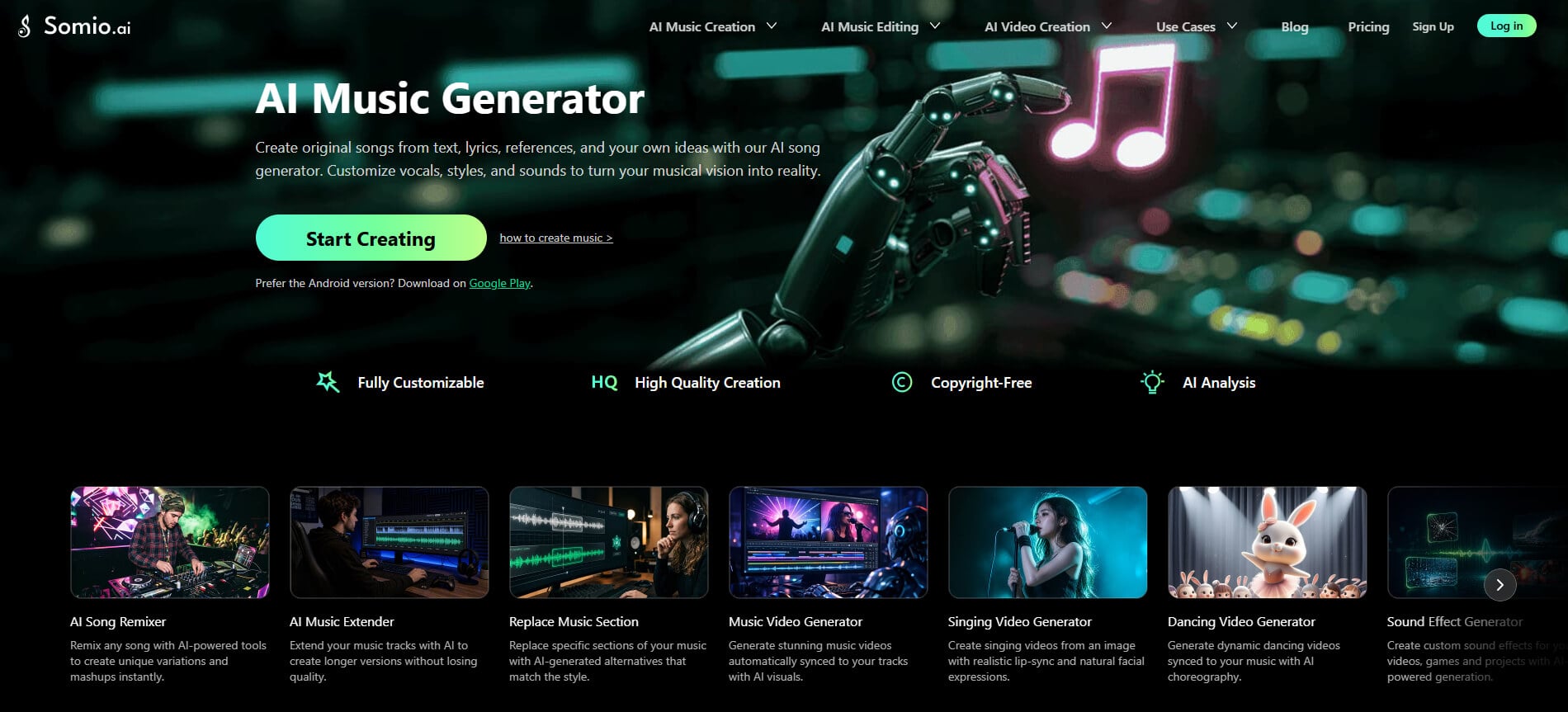
Somio is one of the most efficient AI music generators available for turning ideas into full-length songs within seconds. The platform combines a multi-mode generation system — text-to-music, lyrics-to-song, BGM, and similar song generation — with customizable parameters such as genre, mood, and advanced vocal controls, making it easy for you to create polished tracks without advanced production skills.
There are several ways to start a project in Somio AI music creator. You can describe a musical idea with a simple prompt, paste lyrics, or use reference tracks to generate full songs with vocals, instrumental music, or pure acapella. Beyond specifying your preferred genre, mood, or use case for full songs, you can fine-tune vocal dynamics (gender, style, delivery), use your own voice, or pick from featured AI singers. For background music, you can tailor the atmosphere, tempo, and specific instruments (like piano, synth, or strings) to create loop-ready tracks for videos, games, or podcasts.
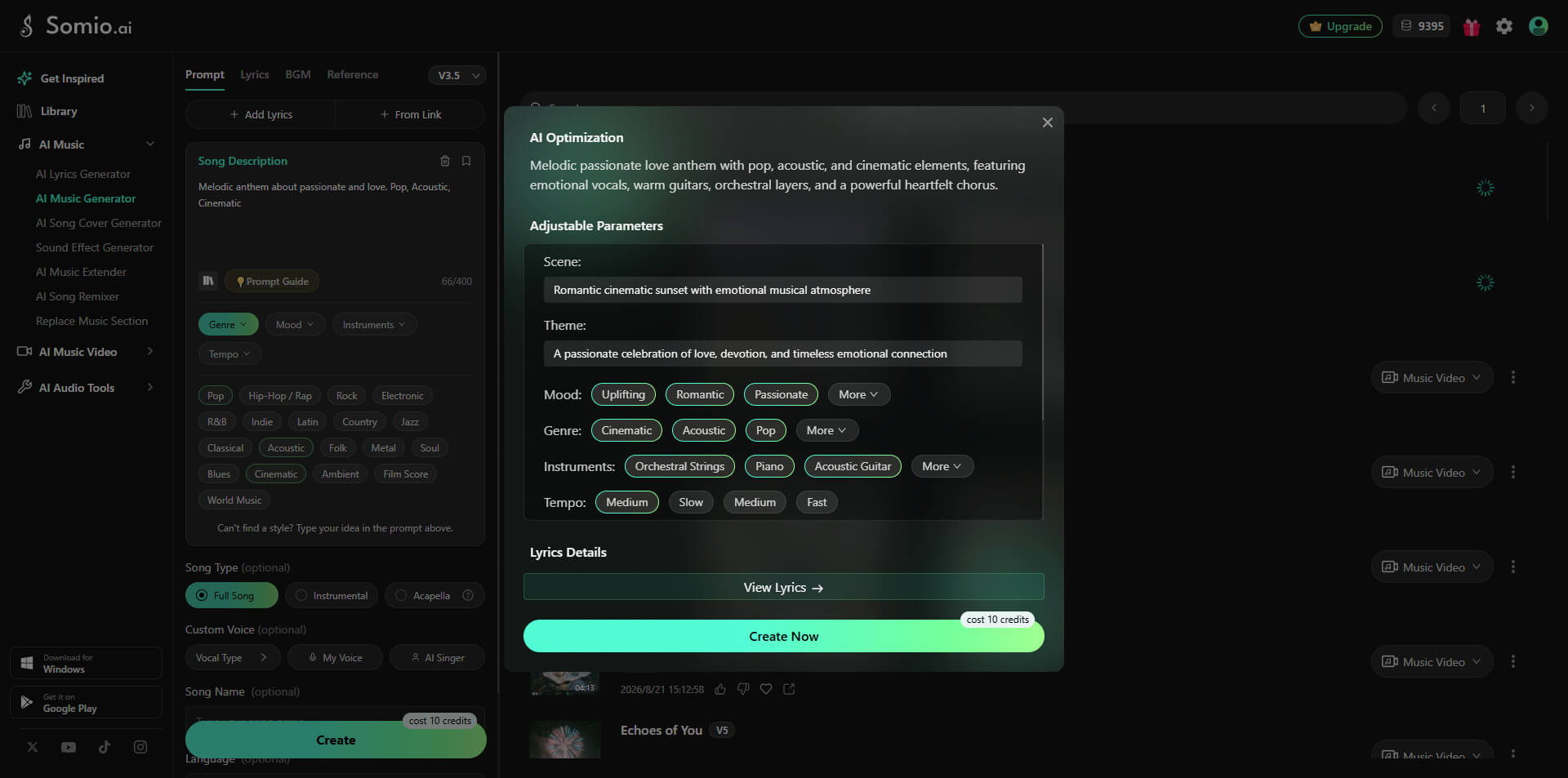
In testing, Somio lets you create AI music that’s consistently structured, not just short loops. Tracks typically include full musical progression and natural flow, which means you can use them as standalone compositions right away. The platform also includes a AI prompt optimization engine that refines your input before generation, helping reduce unpredictable results and improving output consistency.
In addition to music generation, Somio focuses on practical content workflows. It offers a complete suite of audio editing tools, including song remixer, music extension, section replacement, vocal remover, and stem splitter, alongside creative video features like AI music video, lyric video, and singing video generators. Combined with fast rendering speeds, batch generation, and a clean interface, it’s a strong option whether you’re an indie musician, YouTuber, game developer, or marketer who needs ready-to-use music quickly.
Another key advantage is licensing clarity: every generated track includes a full commercial license, so you can safely use the music in videos, ads, podcasts, and social platforms without worrying about copyright claims.
Somio price: Free plan available with limited generation credits. Paid plans unlock higher generation limits.
Pros
- Reliable and high-quality music generation
- Fully royalty-free tracks with commercial use
- Supports both text-to-music, lyrics-to-song, and similar song creation
- Turns simple prompts into accurate musical results
- Batch generation for faster content production
- Generates full-length songs with natural endings
- Smart AI prompt enhancement for better outputs
- Flexible controls for mood, genre, voice, and model selection
- Custom song title input available
- Clean workflow with a beginner-friendly interface
Cons
- Limited deep MIDI or note-level editing
- Heavy usage or access to advanced models requires a paid plan
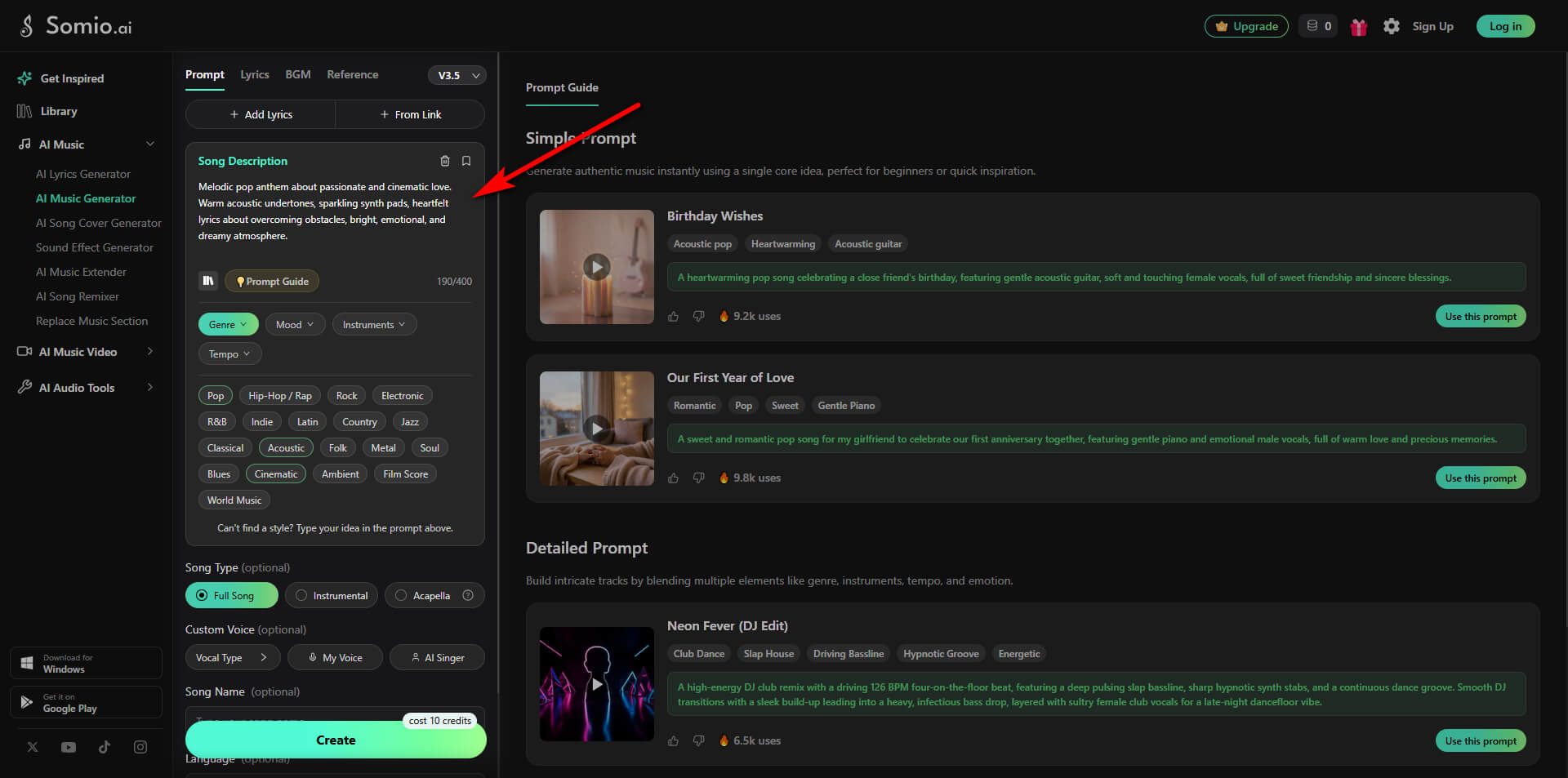
- Step 1Start Your Project: Open Somio AI music generator and select your preferred input mode: Prompt, Lyrics, BGM, or Reference. Enter a brief description of your desired style or mood (e.g., “a cheerful, upbeat pop track for a travel vlog”), paste your lyrics (or use the built-in lyrics generator if you only have an idea), or upload a reference track to guide the AI music generation.
- Step 2Set Your Preferences: Fine-tune your track settings to match your creative vision. Select your target song type (full song, instrumental, or acapella), and customize optional parameters such as genre, mood, instruments, and tempo. Under Custom Voice, refine vocal characteristics (gender, style, delivery), record or upload your voice, or pick a pre-made AI singer.
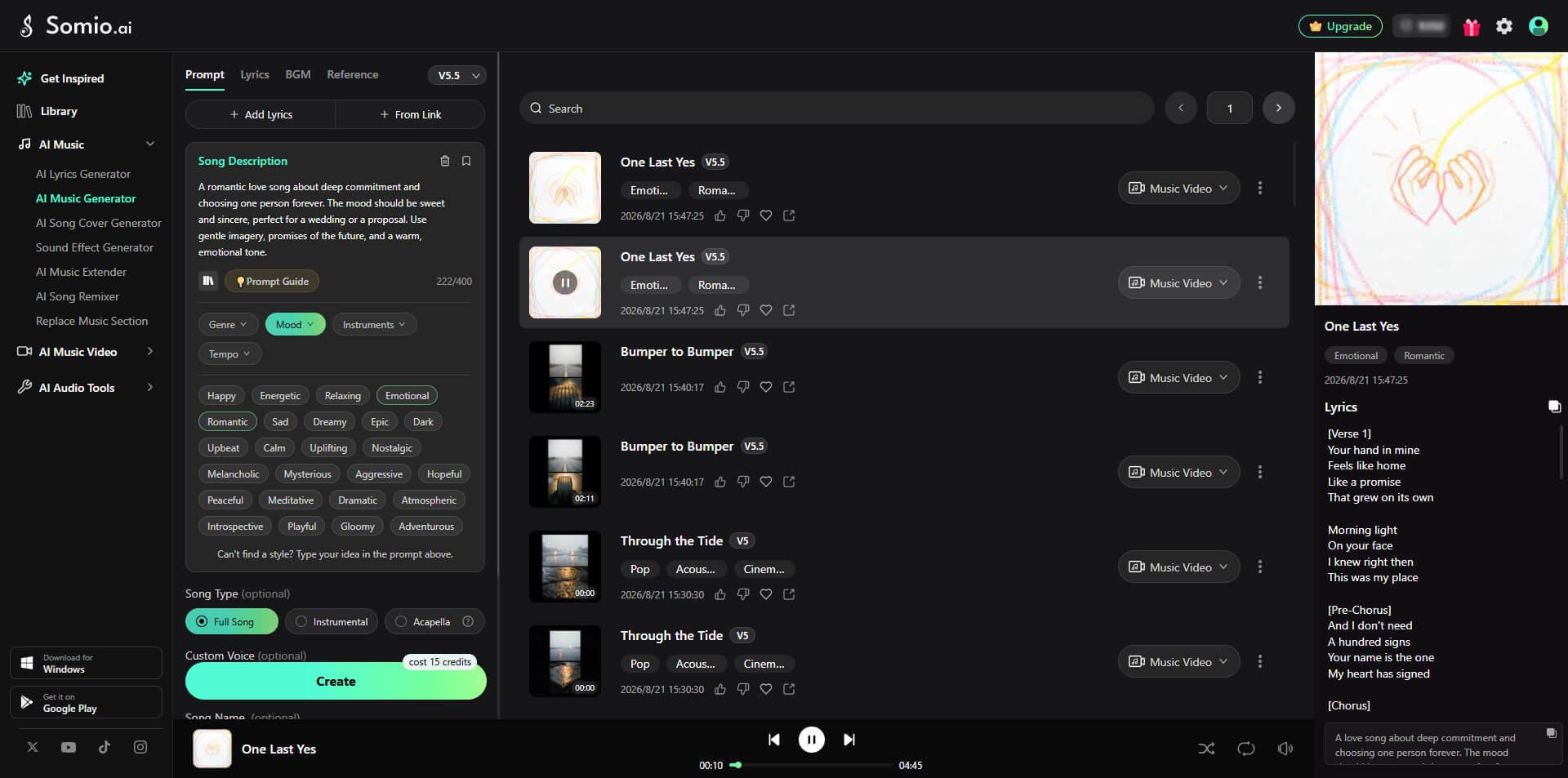
- Step 3Generate and Download Your Songs: Click "Create" to make AI music immediately. Within moments, you can preview your tracks, tweak settings to regenerate, or export in high-quality MP3 or WAV format. Want to take your track further? Use Somio's built-in suite to remix, extend, or convert it into an AI music video.
Suno - Best for Full DAW-Style Control
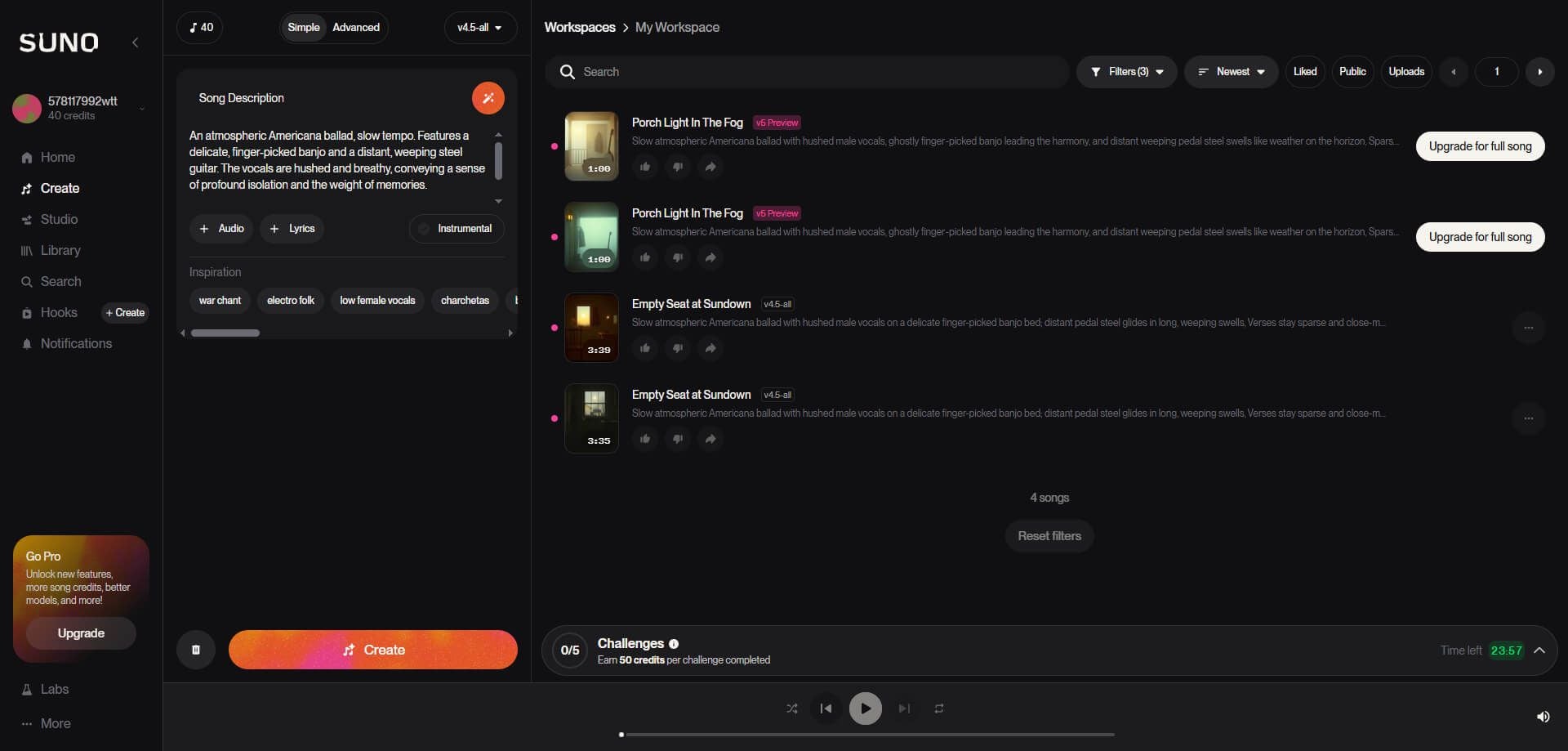
Suno is a powerful AI music generator that puts both creative freedom and precise control in your hands. With the Text-to-Song feature, all you need is a simple natural language prompt, like “a jazz song about watering plants” — and you’ll receive a fully produced track complete with lyrics, melody, vocals, and accompaniment. For more tailored results, you can provide your own lyrics, choose specific music styles, or upload recordings to guide the AI in shaping your song.
A key highlight of Suno is Suno Studio, a web-based generative audio workstation. In this DAW-style workspace, you can edit multiple tracks, fine-tune individual stems, and polish your music entirely within the browser. You also have the option to separate vocals and instruments into up to 12 WAV stems, export MIDI files, and experiment with creativity using the “Weirdness” slider.
In practice, Suno lets you create music with AI, reliably generating full-length songs with rich textures, expressive vocals, and coherent structure. While some lyrics may occasionally feel generic or inconsistent, you still maintain strong creative control, especially when using Studio or Stem tools to refine your tracks.
Suno price: Free plan offers daily credits for experimentation. Paid subscriptions provide commercial rights and expanded credit limits for professional projects.
Pros
- Extremely low barrier to entry with natural language prompts
- Highly expressive, human-like vocals with vibrato and pitch modulation
- Strong creative control via Weirdness slider, Stem export, and Studio editing
- High-quality, studio-ready sound
- Free plan offers daily credits
Cons
- Limited real-time control over detailed musical transitions
- Lyrics quality can sometimes be generic or inconsistent
- Free plan cannot be used commercially and requires multiple generations per session
- Copyright ownership for AI-generated music remains a complex legal topic
Udio - Best for Precise Song Refinement
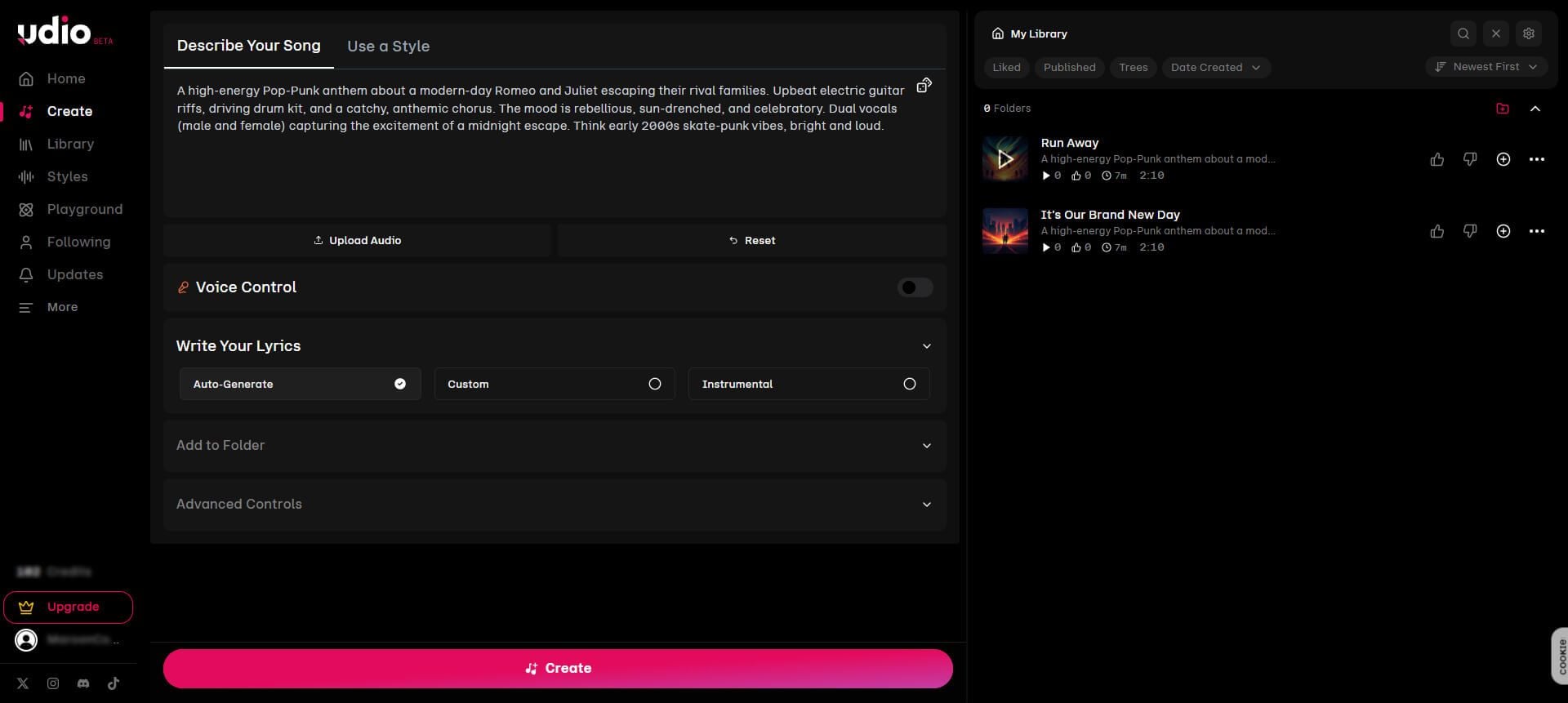
Udio lets you turn text, lyrics, or poetry into fully arranged songs with vocals and instrumentation. You can also paste your own lyrics, generate purely instrumental tracks, or provide a song as a style reference to guide the AI. The platform emphasizes versatility, giving you multiple ways to create, remix, and refine your music.
One of Udio’s strengths is its set of advanced editing tools. With Inpainting, you can replace specific sections of a song without touching the rest, while Extending allows you to lengthen an existing track while preserving its original style. Remixing lets you reinterpret songs with different genre influences or instrument arrangements, offering deeper creative flexibility than many other AI music generators.
Udio AI song maker provides rich presets for instruments and genres, as well as fine-grained control over AI behavior, lyric timing, output quality, and prompt intensity. Meanwhile, the built-in community page enables you to share your creations, follow other creators, and explore new ideas within the ecosystem.
Udio AI music maker delivers clean, professional-sounding tracks, and the inpainting and remix features allow you to refine songs instead of relying on purely random generation. While some outputs, especially lyrics or purely instrumental tracks can vary in quality, the system gives you a powerful combination of speed, accessibility, and creative control.
Udio price: Free plan provides 100 monthly credits with 10 daily usage allowance. Paid plans unlock higher limits and advanced features for professional creation.
Pros
- Intuitive, beginner-friendly interface with modern design
- Extremely high audio quality up to 48 kHz
- Advanced creative tools for inpainting, extending, and remixing tracks
- Free plan provides monthly credits for light experimentation
Cons
- Lacks full DAW-style multi-track editing compared to Suno
- Exporting tracks isn’t always straightforward in certain plans
- Lyrics and instrumental quality can fluctuate
- Advanced settings may not satisfy users seeking professional-level control
Mureka - Best for Personalized Voice Cloning
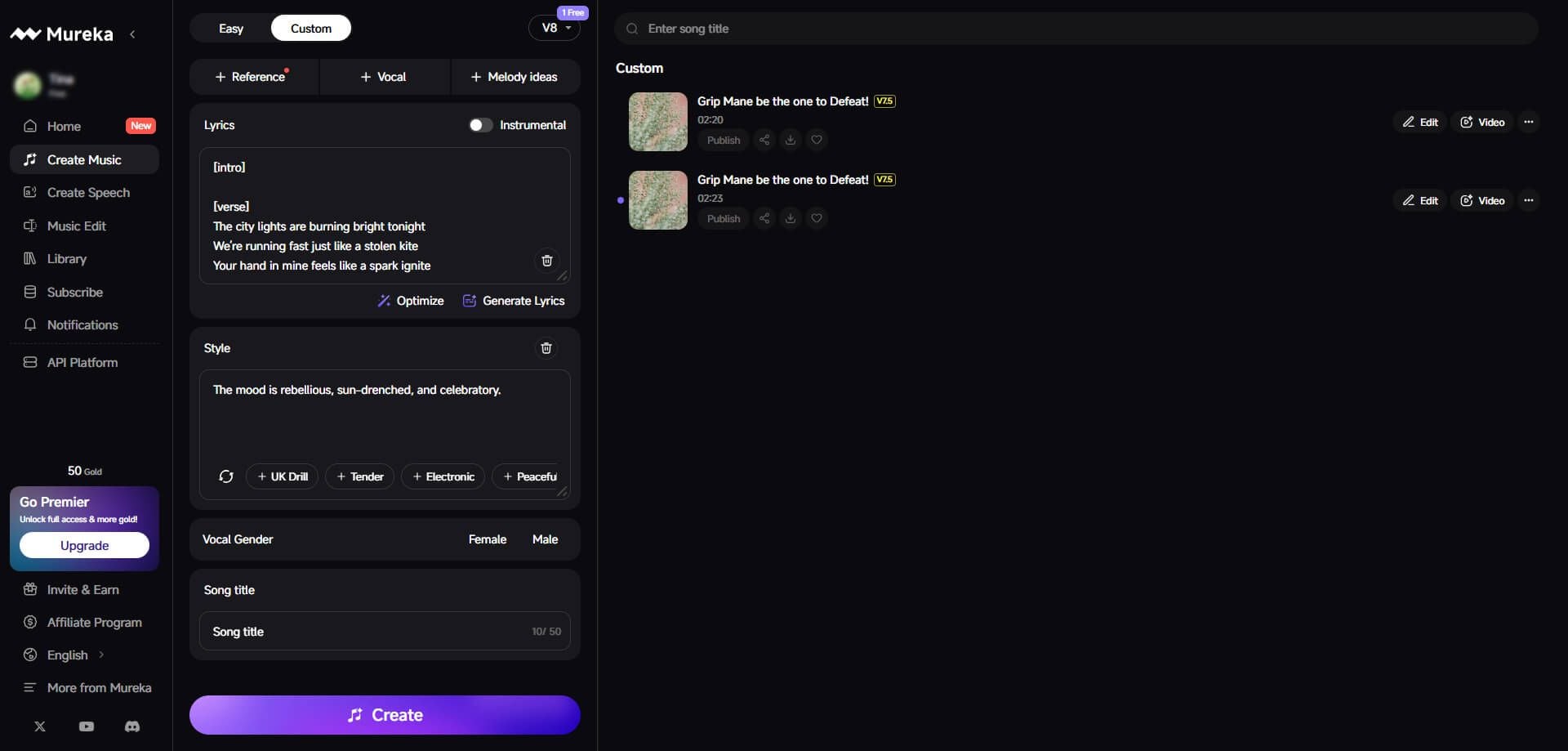
Mureka AI song maker leverages advanced V6/O1 models combined with its MusiCoT “music thought chain” technology to plan song structures before generating audio, helping you create compositions with coherent arrangement and flow. You can input text prompts, lyrics, hummed melodies, reference tracks, or even YouTube links, giving the AI multiple ways to interpret your musical ideas.
A standout feature is voice cloning: you can upload your own recordings or specific vocals, allowing Mureka to generate songs with a distinct personal signature. Beyond that, you can train a personalized AI model using your previous works, ensuring the generated tracks align closely with your artistic style.
You also have fine-grained control over individual sections with Region Editing, which allows precise adjustments and song extensions. Whether you’re producing in English, Spanish, or Chinese, Mureka’s multi-language vocal synthesis helps your music sound natural and expressive across languages. For quick creation, you can use its “basic mode,” or dive into the “advanced mode” for full customization of composition, arrangement, and vocal characteristics.
In testing, Mureka AI song creator excelled at turning rough inspirations into coherent, listenable tracks with a strong sense of structure. While some generated instruments—particularly drums and accompaniment—may feel less dynamic, and multi-language lyrics occasionally require minor edits, the platform is ideal if you value originality, vocal personalization, and having structured guidance for your compositions.
Mureka price: Free trial available with limited usage. Paid plans provide extended model training, additional generation credits, and full commercial rights for your tracks.
Pros
- Voice cloning and custom AI model training for unique, recognizable tracks
- Structured song generation with MusiCoT “music thought chain” technology
- Quickly turns raw ideas or hummed melodies into complete compositions
- Flexible modes: quick generation or advanced customization
- Full platform support for both desktop and mobile creation
Cons
- Post-production mixing options are limited for professional-level refinements
- Multi-language lyrics occasionally sound awkward or stiff
- Learning curve higher due to model training and advanced editing features
- Some instruments and drum patterns may sound generic
Soundraw - Best for Customizable Instrumental Tracks
Soundraw AI music creator takes a different approach from many AI music generators: instead of relying on text prompts, you can create music by selecting parameters such as mood, genre, instruments, tempo, and track length. This makes it especially easy if you want to quickly generate background music for videos, social media, or podcasts without needing any musical expertise.
Once a track is generated, the Song Structure Editor lets you adjust the arrangement, like building blocks—you can shorten or extend sections, swap intros or choruses, and experiment with endings. The built-in Audio Mixer lets you modify the intensity of individual elements in real-time or mute specific instruments to refine your sound. For advanced workflows, Stem export allows you to download separate WAV files for each instrument, making further editing in professional DAWs like Logic or Ableton seamless.
The V2 system also supports genre mixing, letting you combine different styles — such as Jazz + EDM—to produce distinctive cross-genre tracks. Music generated through Soundraw is stable, coherent, and loop-friendly, making it ideal for creators who need reliable instrumental compositions at scale. Even free users can generate and preview unlimited tracks until you’re satisfied, although downloading requires a paid plan.
Soundraw price: Free plan available for unlimited previews. Paid plans unlock downloads, stem exports, and full commercial usage rights.

Pros
- Intuitive settings-based generation using genre, mood, instruments, length, and tempo
- Powerful Song Structure Editor for adjusting intros, choruses, endings, or overall track length
- Real-time audio mixer to tweak melody, accompaniment, bass, and drums instantly
- Stem export for independent instrument tracks to use in professional DAWs
- Genre mixing allows creation of unique hybrid styles
Cons
- Does not support vocal or lyrical generation
- Limited depth for highly dramatic or emotionally complex compositions
- Free plan allows unlimited preview but no downloadable files
- Generated tracks may sound formulaic without manual editing
ElevenLabs - Best for Human-like Vocals
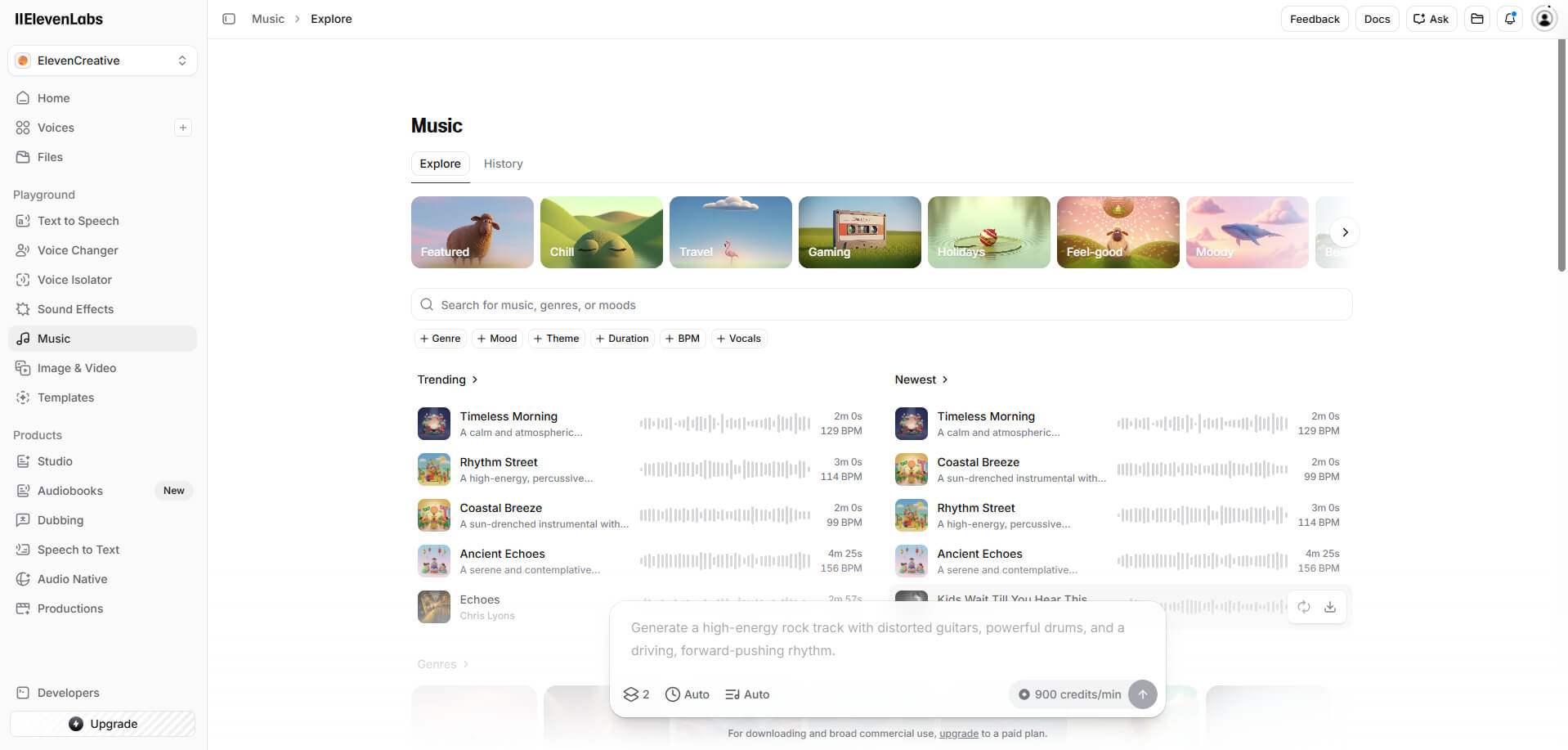
ElevenLabs AI song creator brings its world-leading expertise in voice synthesis into AI music generation, allowing you to create complete songs, including melody, arrangement, and vocals — simply by providing a natural language description. Whether you need a 10-second snippet or a 5-minute full track, the platform delivers remarkably consistent, studio-quality output.
The standout feature is the realistic vocal synthesis: each voice is generated with lifelike pitch variations, emotional expression, and subtle breathing, producing results that many users describe as “scary real.” Combined with deep style customization — covering tempo, key, instruments, and genre blending, you can tailor each track to fit your project without needing any prior music production skills.
While ElevenLabs AI music maker excels at rapid, high-quality music creation, it currently lacks multi-track editing like Suno Studio, so you have less granular control over individual stems. Some users note occasional minor stability issues during generation. Despite these limitations, the platform is perfect if your priority is fast, realistic, and emotionally expressive AI-generated music.
ElevenLabs price: Free trial available with limited credits. Paid plans provide additional generation capacity, access to high-quality output, and commercial rights for your tracks.
Pros
- Scarily realistic vocal synthesis with subtle breaths and emotional nuances
- One-click full track generation from a simple text description
- Flexible style customization for tempo, instrumentation, key, and genre blending
- Multi-language vocal support including German, Spanish, and Japanese
- Studio-grade audio output at 44.1 kHz, ideal for direct content use
Cons
- Limited export formats (mainly MP3)
- Lack of multi-track editing and deep stem control
- “One-click” workflow limits micro-level creative adjustments
- Some early stability issues reported, such as interface lag or occasional timing mismatch
- High credit consumption can make extensive experimentation costly
Beatoven.ai - Best for Emotion-Driven Video Soundtracks
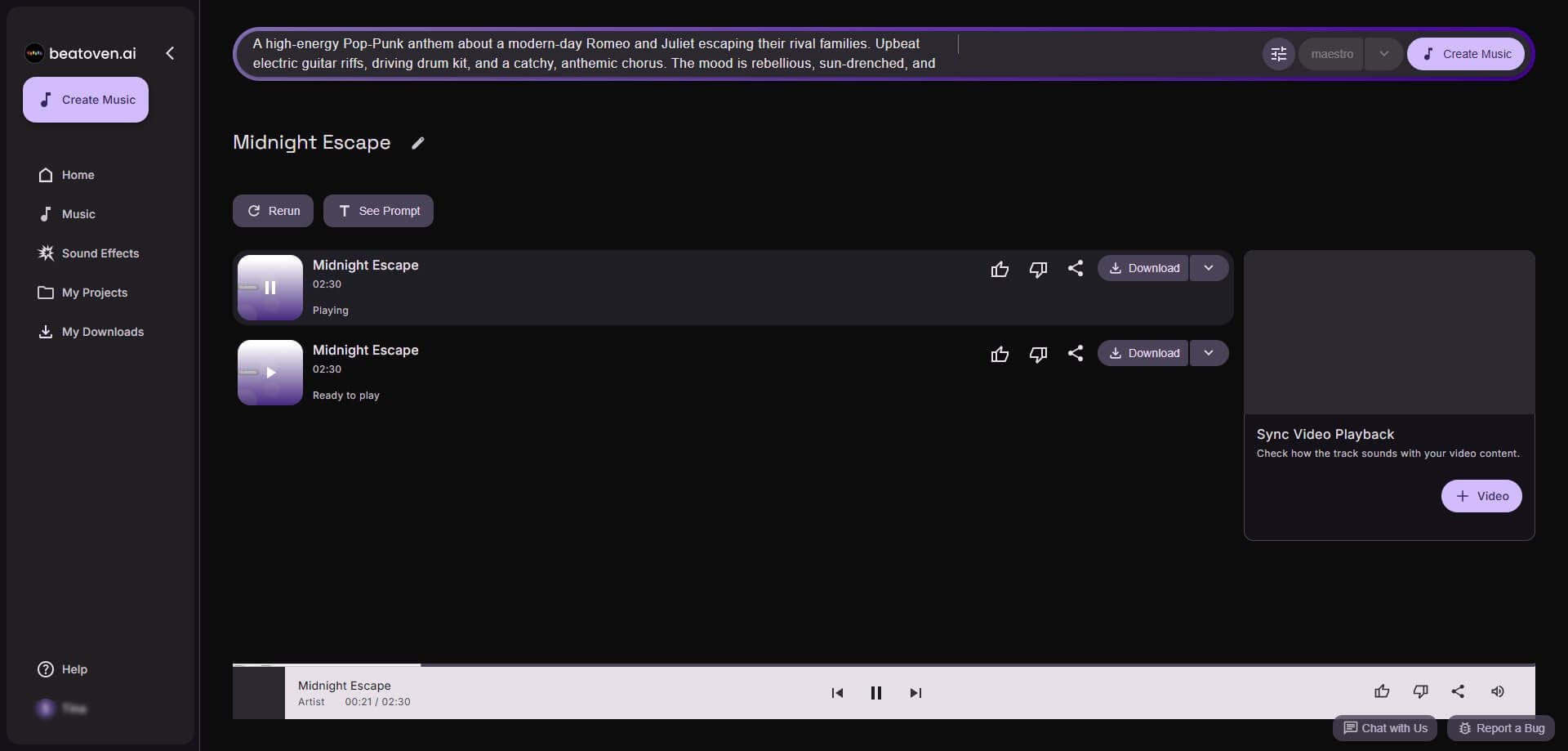
Beatoven.ai is designed for creators who need music to resonate perfectly with storytelling. You can assign specific emotions, such as sadness, inspiration, or dreaminess to different sections, and Beatoven will adjust melodies, harmonies, and instrumentation to reflect the chosen mood. By entering parameters like length, atmosphere, era, and occasion, you can let the Maestro model build a track from scratch tailored to your narrative.
You can refine your work without starting over using the Select & Recompose tool, which allows localized adjustments to segments that don’t meet your expectations. Each generation provides a main track and four alternate versions, making it easy to preview different emotional interpretations. Combined with Track History, you can revisit any previous version to ensure your story-aligned soundtrack evolves exactly as you want.
For real-time control, Beatoven provides fine-grained mixing options, allowing you to adjust or mute specific instruments, tweak tempo, or shift the style dynamically. In practice, Beatoven.ai shines when creating music that mirrors the emotional arc of your content. While it does not generate vocals, the instrumental tracks are flexible, culturally rich, and highly adaptable to videos, podcasts, or Vlogs. Free users can generate unlimited previews, though downloads require a subscription and are billed by duration, which is something to consider for long-form content.
Beatoven.ai price: Free plan allows unlimited previews. Paid subscriptions unlock downloads, extended track length, and full royalty-free commercial usage.
Pros
- Emotion-based generation to match specific moods in different song sections
- Intuitive Maestro model for text-to-music creation from scratch
- Select & Recompose tool allows precise editing of individual segments
- Provides multiple alternate tracks for quick comparison
- Track history preserves every version, letting you roll back anytime
Cons
- No vocal or lyrical generation, purely instrumental
- Audio quality and style may vary depending on mood and genre
- Generated tracks cannot be directly distributed to Spotify or Apple Music
- Free plan does not support downloads, and paid plans charge per download length
AIVA - Best for Cinematic Composition
Most AI music generators focus on quick inspiration—generate a loop, download it, and move on. AIVA AI music maker takes a different approach: it behaves more like a digital composer assistant than a one-click music generator.
At the core of the platform is its Lyra foundation model, which allows you to create tracks anywhere from 30 seconds to 10 minutes using natural language prompts. You might describe the mood, era, instrumentation, or scenario, and AIVA will construct a piece that evolves over time rather than repeating simple patterns.
One of AIVA’s biggest strengths is its structured composition engine. Instead of producing endless loops, it generates music with recognizable sections such as intro, build-up, development, and climax. This structure is especially useful for cinematic scoring, where music needs to follow narrative pacing.
AIVA also offers a library of more than 250 musical styles, covering everything from classical orchestral and epic film scores to jazz, electronic, and modern pop. If you want even more control, you can upload MIDI or audio references, allowing the AI to learn specific melodic or stylistic traits from your material.
For music producers, AIVA integrates smoothly with professional workflows. In addition to exporting MP3 or WAV, it supports MIDI files and multi-track stems, so you can continue editing inside DAWs like Logic Pro or Ableton Live. There’s even a built-in MIDI editor in the browser, letting you tweak notes, chord progressions, and rhythms directly before exporting.
AI composition plus manual editing makes AIVA feel less like a novelty generator and more like a collaborative composition tool.
AIVA price: Free plan available for non-commercial use with attribution and limited exports. The Pro plan (~€49/month) unlocks full commercial rights and advanced export options.
Pros
- Musically coherent compositions with strong harmonic structure
- MIDI and stems export for professional DAW workflows
- Capable of generating long-form tracks up to 10 minutes
- Clear copyright ownership under the Pro plan
Cons
- No AI vocal or lyric generation
- Interface can feel complex for beginners
- Free plan has strict usage limitations
- Higher price compared with most AI music generators
Conclusion: Which is the Best AI Music Generator for You?
There’s no single “best” AI music generator for everyone, only the one that fits your workflow and creative goals. After testing dozens of tools, Somio AI music creator stands out for turning simple prompts, lyrics, or reference music into studio-quality songs with custom voice models, realistic vocals, or polished instrumental backgrounds, while offering smart prompt optimization and clear commercial licensing. Other tools on this list also shine in specific areas, from instrumental background tracks to cinematic composition.
Ultimately, the right choice depends on your needs, but if you want a well-rounded AI music generator that balances quality, speed, and licensing clarity, Somio is a great place to begin.
Ready to create your AI songs? Let Somio bring your ideas to life.
FAQs about Best AI Music Generators
- What is the best AI music generator?
The best AI music generator depends on your needs, but Somio AI song maker stands out for beginners and creators alike. Just enter a simple prompt or your lyrics, customize the style, mood, or voice, and let the AI do the rest. With smart prompt analysis, Somio better understands your ideas and turns them into studio-quality songs with natural rhythm and realistic vocals. In seconds, you’ll have a royalty-free track ready to download and share.
- Can I use AI-generated music for commercial use?
Yes, many platforms allow it. With Somio AI music generator, you can create royalty-free tracks suitable for YouTube videos, ads, podcasts, games, and social media. The AI music creator provides clear commercial licensing, so you can safely use and monetize your AI-generated music across platforms.
- Is it legal to create AI music?
In most cases, it’s legal to generate AI music using these music tools. What matters is the licensing terms of the platform you use. Tools like Somio provide full licensing and royalty-free music, making it easier for creators to use AI-generated songs in videos, marketing, or commercial projects.
- Can I download music from Al music generator?
Yes. Most modern AI music creators allow you to download the music you create. With Somio, you can generate full songs or background tracks right away, download them as MP3 files, and instantly share them on social media or use them in your videos and projects.
- Is there an AI app that can make music?
Yes, Somio AI song creator makes the process incredibly simple and flexible. Just enter a short prompt or lyrics, choose the mood, genre, vocal genre if you like, and the AI creates a complete song with vocals or background music that you can preview, download, and share instantly.
- What is AI song generator?
An AI music maker is a tool that uses artificial intelligence to create music automatically. Instead of composing manually, you simply describe the style, mood, or lyrics you want, and the AI generates a complete track with instruments and vocals within seconds.
- How does AI music generator work?
A free AI music generator uses trained AI models to analyze your text prompts, lyrics, or style preferences and turn them into complete music tracks. The process is usually very simple. Take Somio as an example:
1. Describe the mood or scene you want.
2. Then you can adjust options like style, instruments, tempo, or whether to include vocals.
3. Finally, click "Create," and within seconds the AI generates a full song or background track that you can preview, download as MP3, and use in your projects.