
Have you ever wanted to create your own music but didn't know where to start? For a long time, making music required instruments, studio software, and years of training — putting it out of reach for most people.
Today, AI music generators make it possible for anyone to create songs in minutes. With the right AI music tool, you can generate music simply by entering a text prompt, choosing a genre, and letting the AI compose a track automatically.
AI-generated music is now widely used for YouTube videos, podcasts, social media content, games, and marketing projects.
In this guide, you'll learn how to make AI music step by step and discover tips to generate better AI songs quickly, even if you have no musical background. Let's get started and create your AI tracks.
Part 1. What's an AI Music Generator?
An AI music generator is a tool that uses artificial intelligence to create music automatically. Instead of composing melodies, arranging instruments, or mixing tracks manually, you can generate music with just a few simple inputs.
Most AI music generators work by letting you enter a text prompt, choose a style, or upload lyrics. The AI then analyzes patterns from large music datasets and composes a track within seconds. These AI music tools can create background music, beats, or full songs for YouTube, podcasts, social media, and more. In the next section, we'll show you how to make AI songs using one of the best AI music generators, so you can instantly create high-quality and royalty-free music.
Part 2. Why Create a Song with AI?
AI music tools make it easier than ever to create music with AI for personal or professional projects. Instead of spending hours composing or hiring a producer, you can generate custom tracks in minutes using an AI music generator.
One of the biggest advantages is flexibility. You can generate AI music for many different scenarios. For example, podcasters can create unique theme music or sound effects. Video creators can make background tracks that match the mood of travel vlogs, storytelling videos, or short-form content. Some creators even experiment with AI songs for anonymous YouTube channels or social media pages that rely on relaxing background music.
AI music is also useful for indie creators and developers. You can produce soundtracks for games, short films, or animations without renting a studio or hiring composers. Because AI tools enable rapid iteration, it's easy to make songs with AI in multiple styles until you find one that fits your project.
Part 3. How to Make AI Songs Online for Free?
Creating AI songs online is surprisingly simple. With modern AI music generators, you can turn a prompt or lyrics into a fully produced track in seconds. One of the easiest tools to try this process is Somio AI music maker.
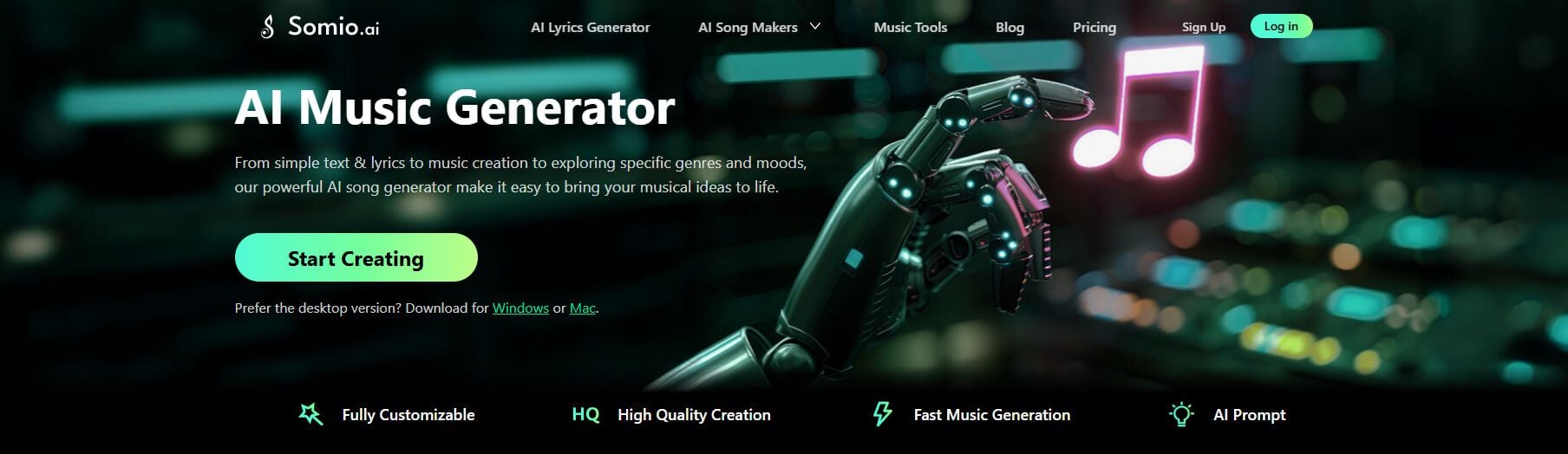
Somio is an efficient AI music generator that turns ideas into full songs within seconds to minutes. It can create AI music from text prompts, lyrics, or reference track links, allowing you to easily produce complete songs with vocals, instrumental tracks, or pure acapellas.
The AI music creator not only lets you adjust elements like genre, mood, vocals, and instruments, but also intelligently refines your prompts to generate more accurate, polished results. With fast generation and a clean, beginner-friendly interface, Somio helps creators turn ideas into ready-to-use songs instantly. Every track you generate comes fully royalty-free, so you can safely use it in videos, podcasts, games, and marketing content.
- High-quality and reliable AI music generation
- Full-length songs with natural structure and endings
- Flexible controls for genre, mood, vocals, and style
- Smart prompt optimization for better results
- Batch generation for faster music creation
- MP3 and WAV downloads for easy use
- Clean, beginner-friendly creation workflow
- Reference track links upload to create similar songs
- Song generation with your own voice or AI singers
Method 1: Text to Music — Generate Tracks from Simple Text Prompts
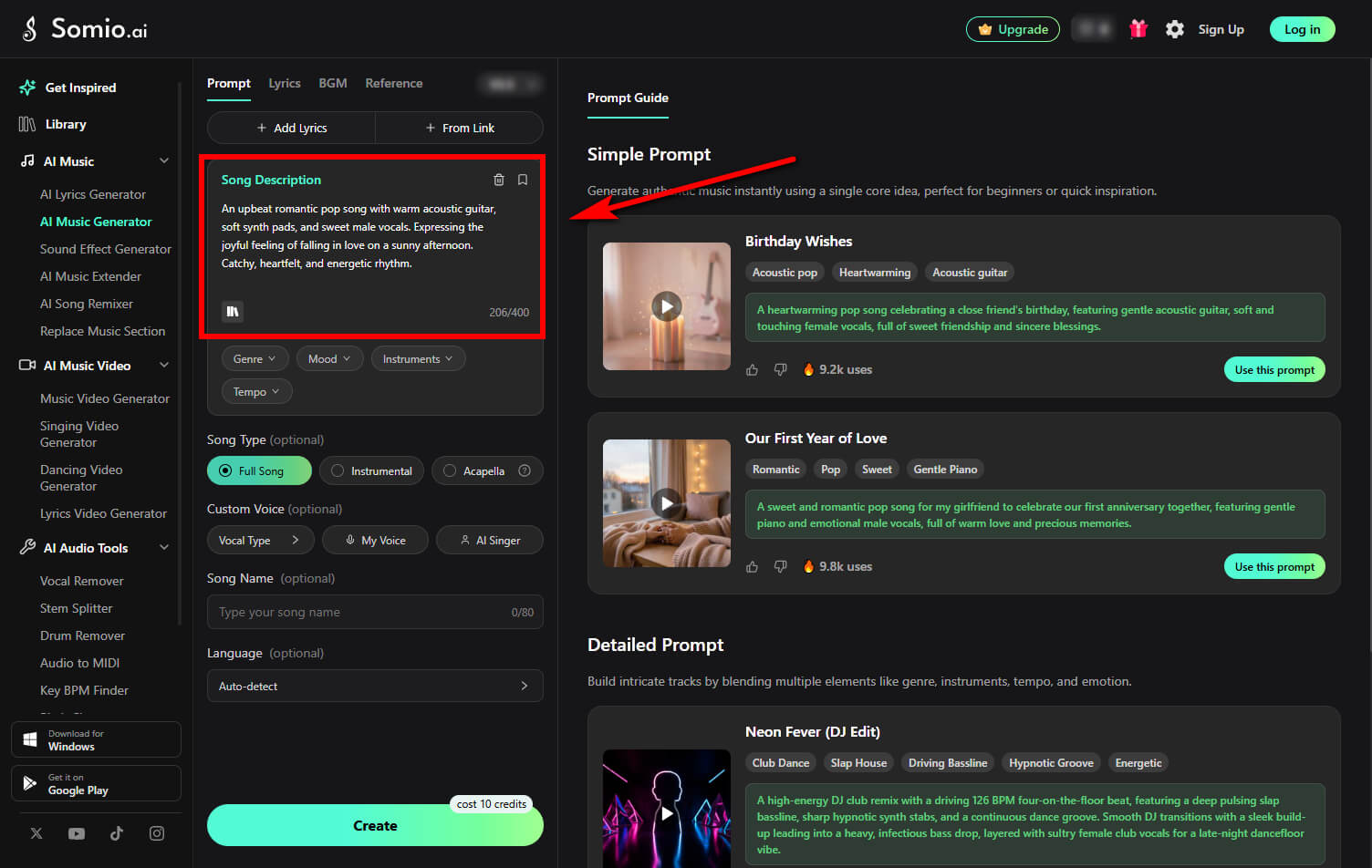
- Step 1Start Your AI Music Project: Text-to-song feature allows you to transform simple text descriptions into complete, high-quality music tracks. Open the Somio AI music generator and stay on the Prompt tab. Simply enter a short description of your musical idea, style, mood, or scene to give the AI clear creative direction.
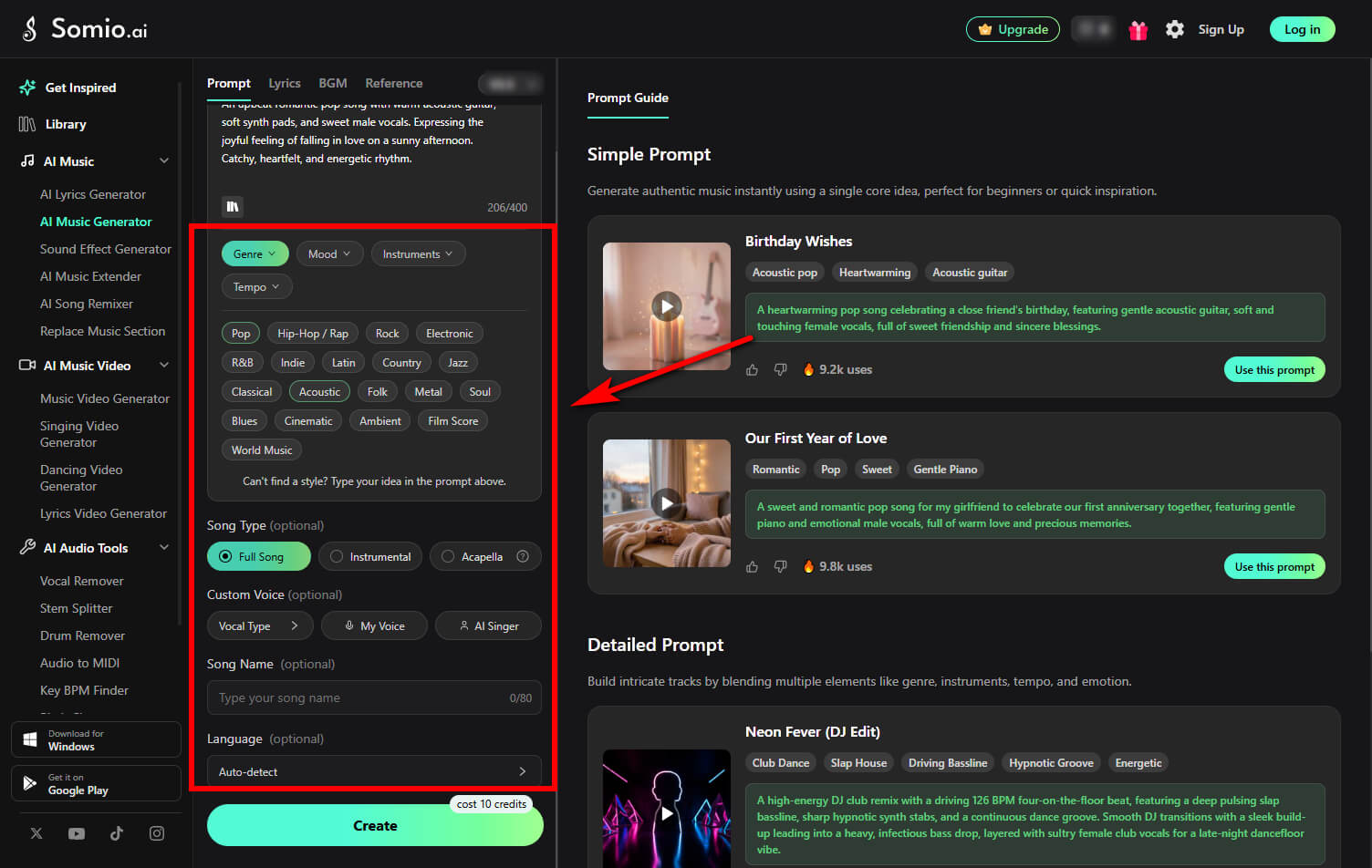
- Step 2Adjust Style, Mood, or Sound: After entering your idea, refine the output by choosing or customizing settings such as genre, mood, instruments, tempo, or song type (full song, instrumental, or acapella). These controls help the AI music creator understand your direction and help you create AI songs that sound more polished.
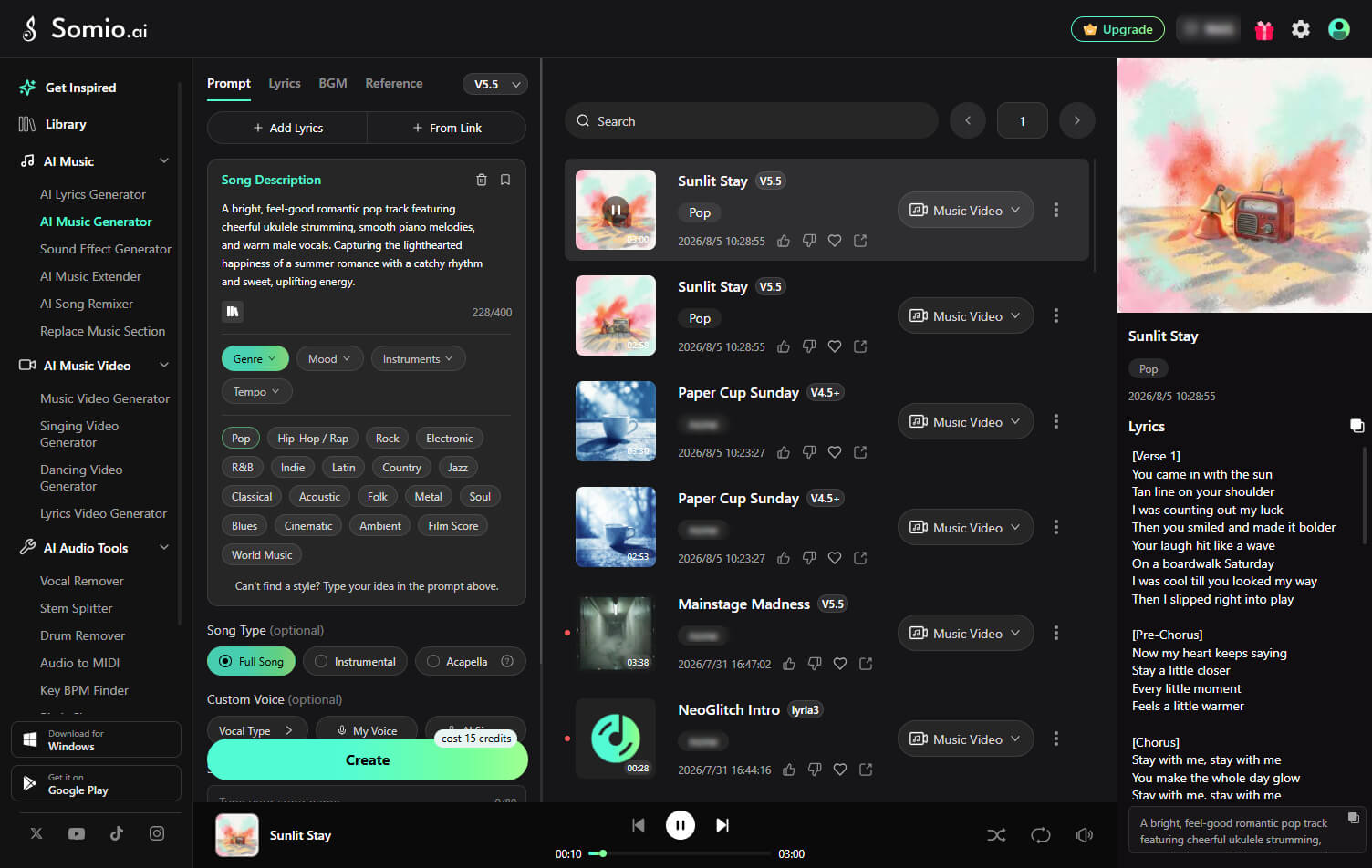
- Step 3Generate and Download Your AI Song: Click "Create" to generate your AI music. Within seconds to minutes, Somio produces complete tracks. You can then instantly preview and download the songs in MP3 or WAV format or share them online for videos, podcasts, or social media.
Method 2: Lyrics to Music — Turn Your Lyrics into Complete Songs
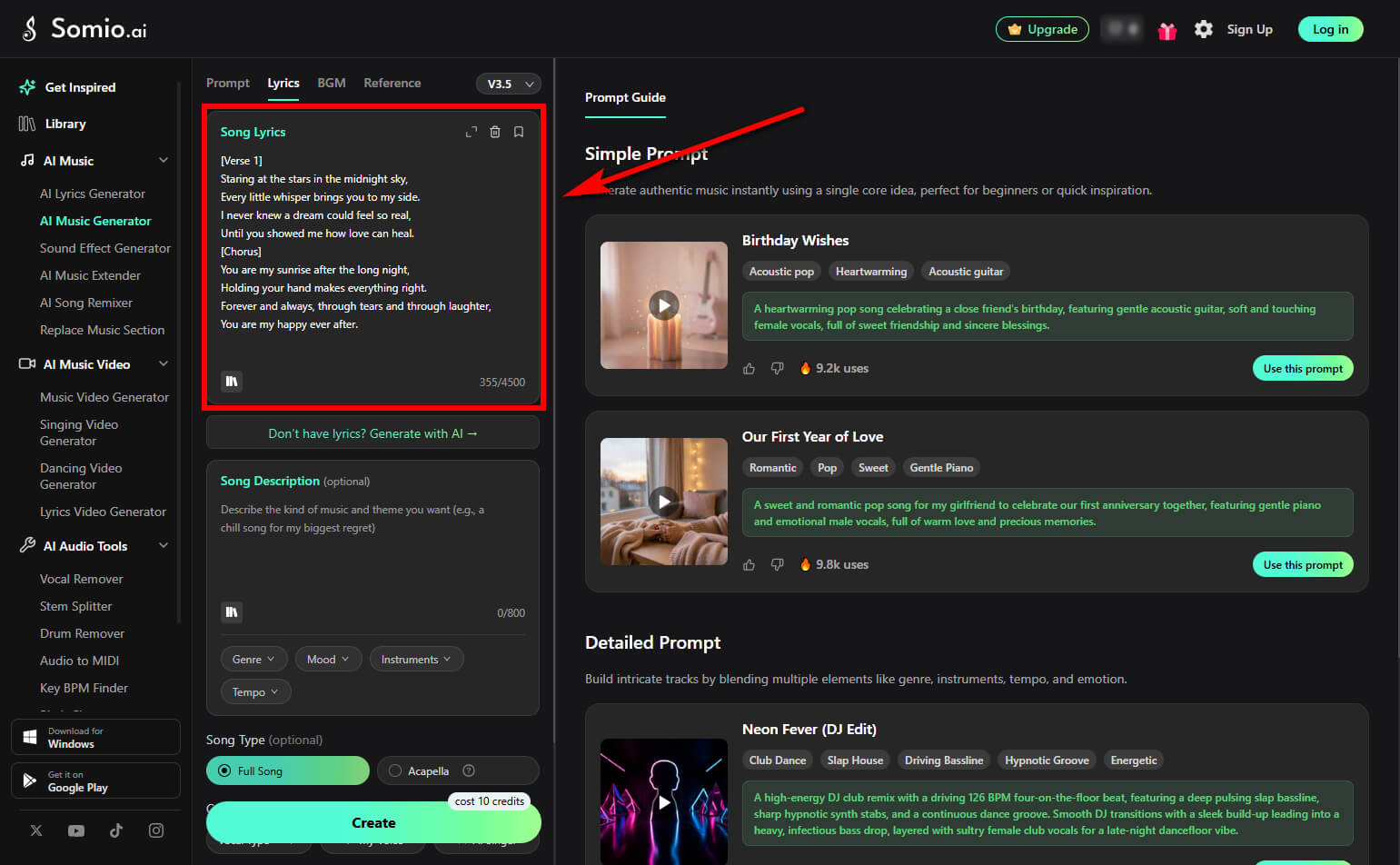
- Step 1Paste Your Lyrics: Go to the Lyrics tab in the Somio AI song maker, then paste your lyrics into the input box to turn your words into unique AI-generated songs. If you don't have lyrics yet, you can use the built-in AI song lyrics generator to create original lyrics and start your song from scratch.
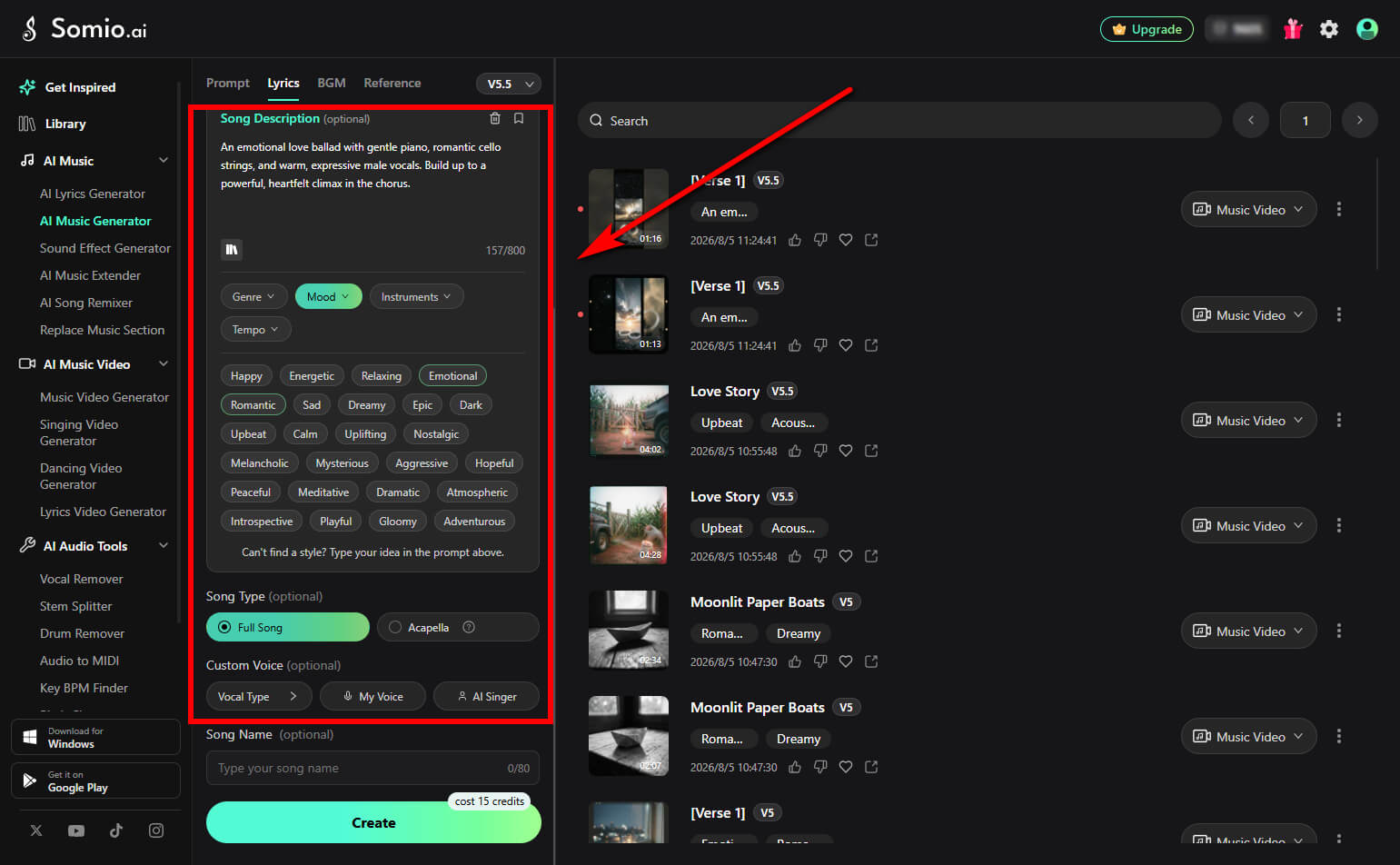
- Step 2Customize Your Song Style and Voice: Describe your desired music style, mood, instruments, tempo, and use case to guide the AI's music creation. Choose between a full song with vocals and instrumental backing or an acapella version, and customize the voice style for a more personalized result.
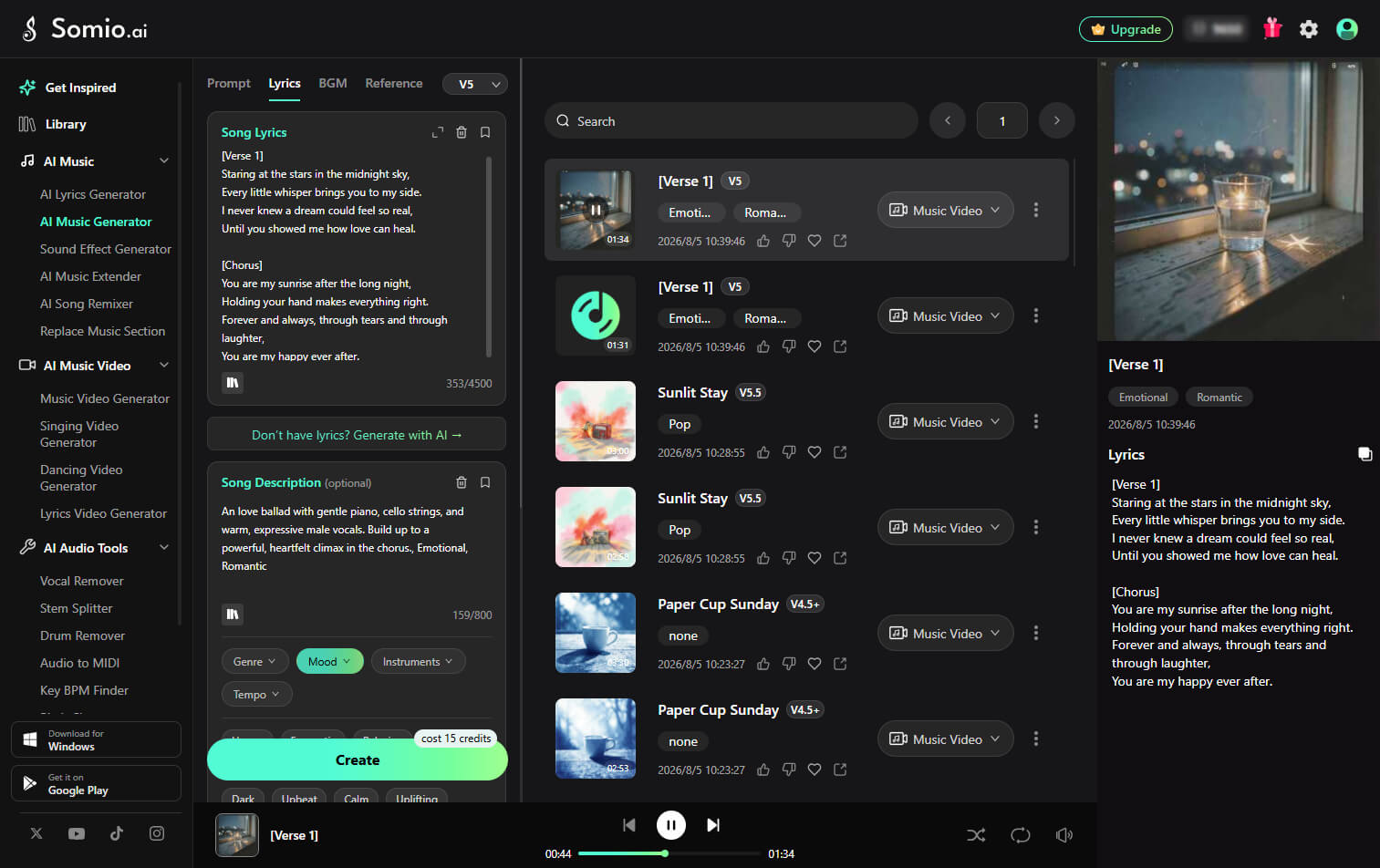
- Step 3Create Your Song from Lyrics: Click "Create" to turn your lyrics into full, studio-quality tracks. Preview the generated results, pick your favorite version, and download high-quality MP3 or WAV files for your projects.
Method 3: BGM Generation — Create High-Quality Background Music
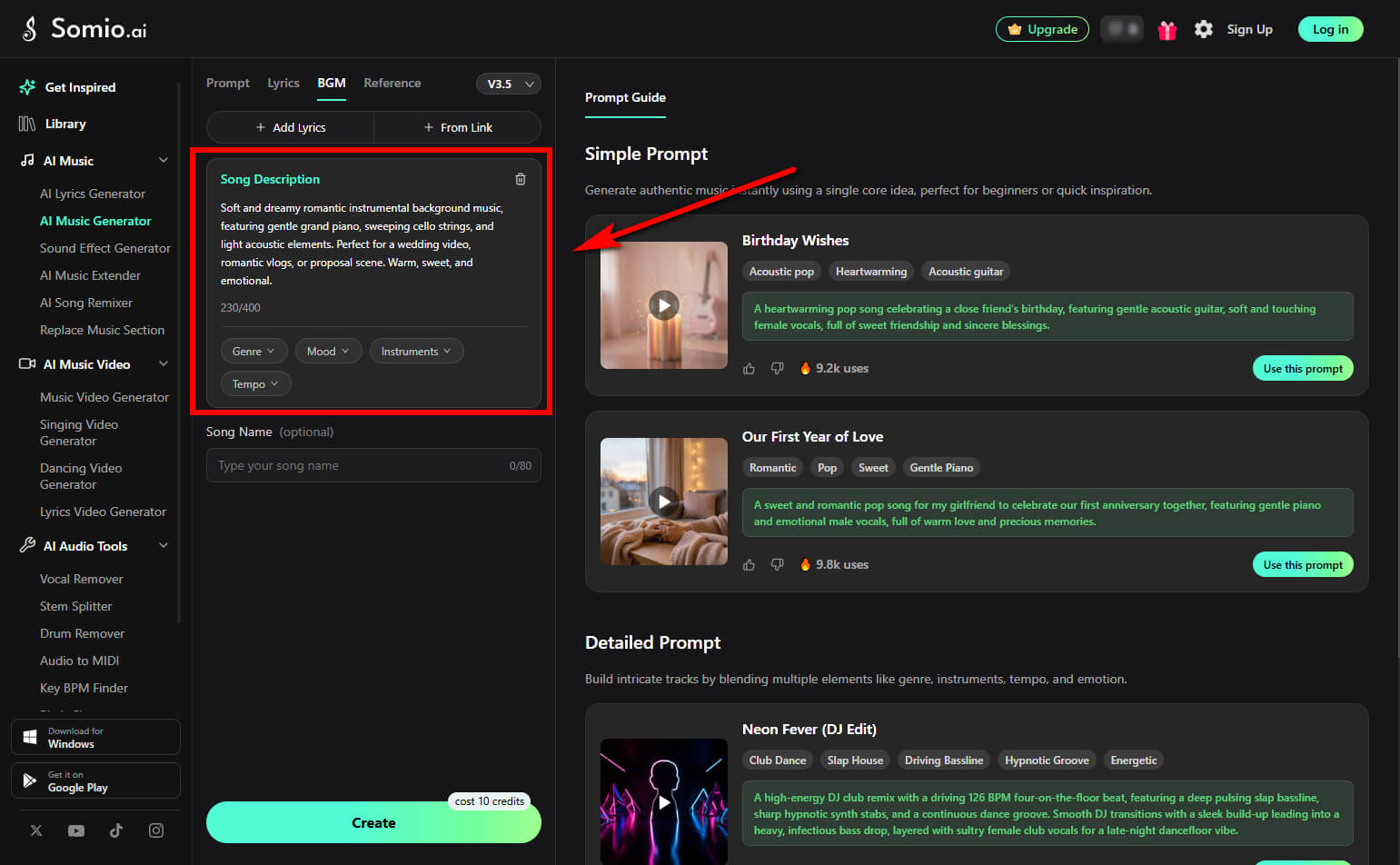
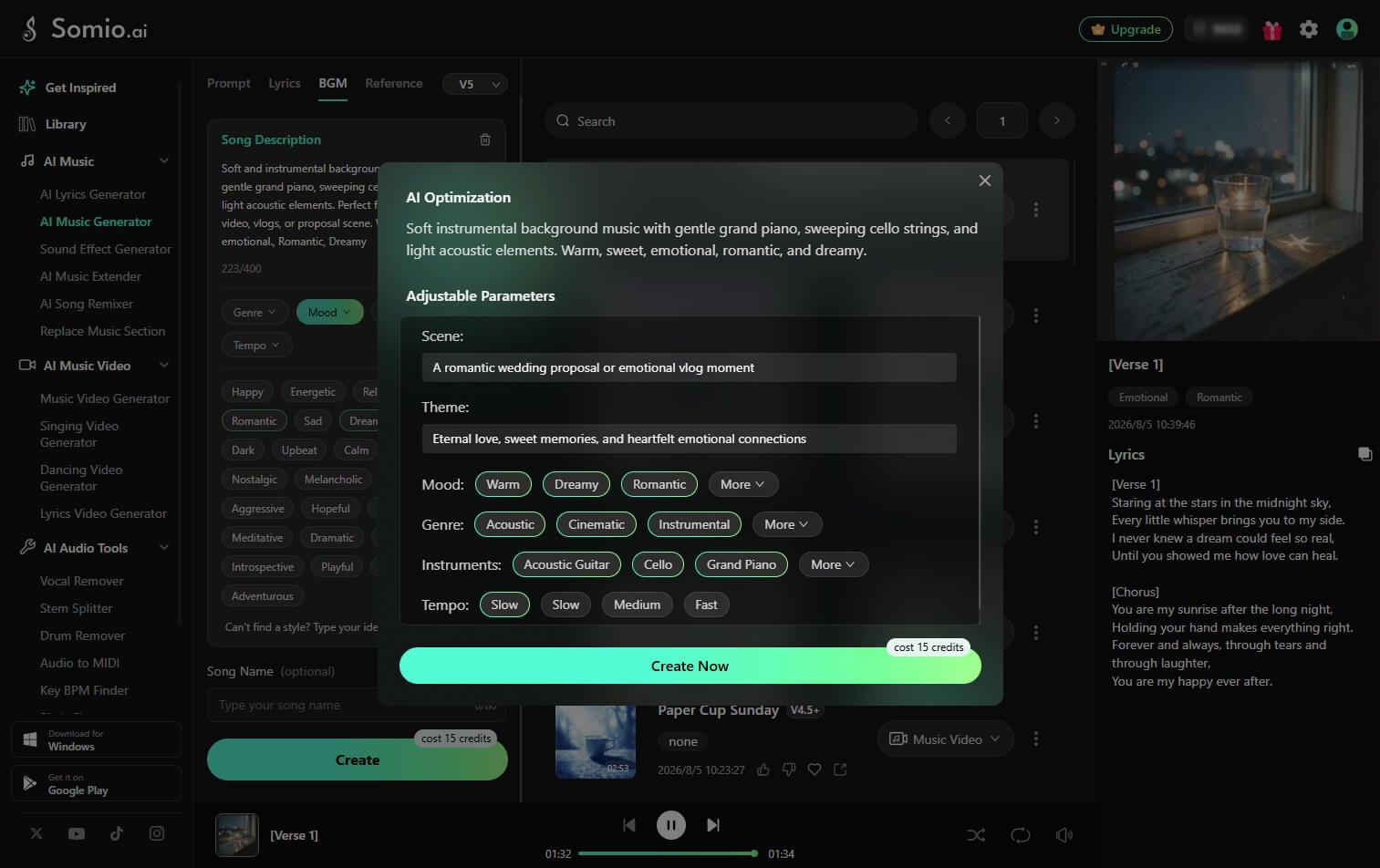
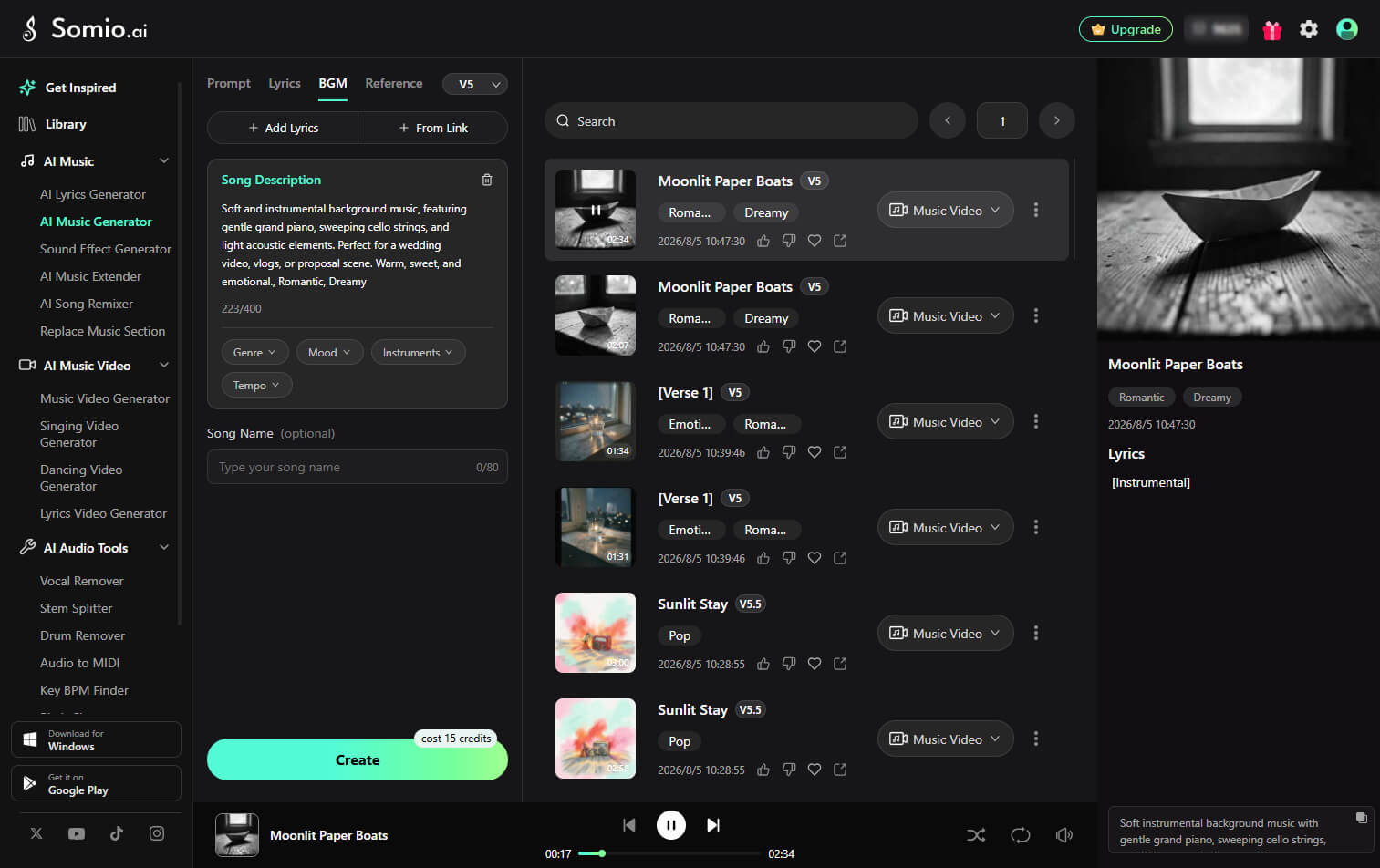
- Step 1Describe the BGM You Need: Designed for seamless instrumental scoring, the background music generator helps you build rich atmospheric audio without vocals. Head over to the BGM tab in the Somio AI song generator and enter a prompt describing the mood, style, or scene you need — such as dynamic gaming background music, relaxing lofi study beats, or cinematic movie scores.
- Step 2Customize Your BGM Style: Adjust the instruments, genre, mood, and tempo to shape the sound you want. These settings help create background music that fits your videos, podcasts, or streams while keeping the focus on your main content.
- Step 3Generate and Download Your Background Music: Hit "Create" to generate your custom instrumentals. Preview different versions, choose your favorite track, and download it in MP3 or WAV format for your videos, podcasts, or other projects.
Method 4: Similar Song — Make AI Songs Inspired by Your Reference Track
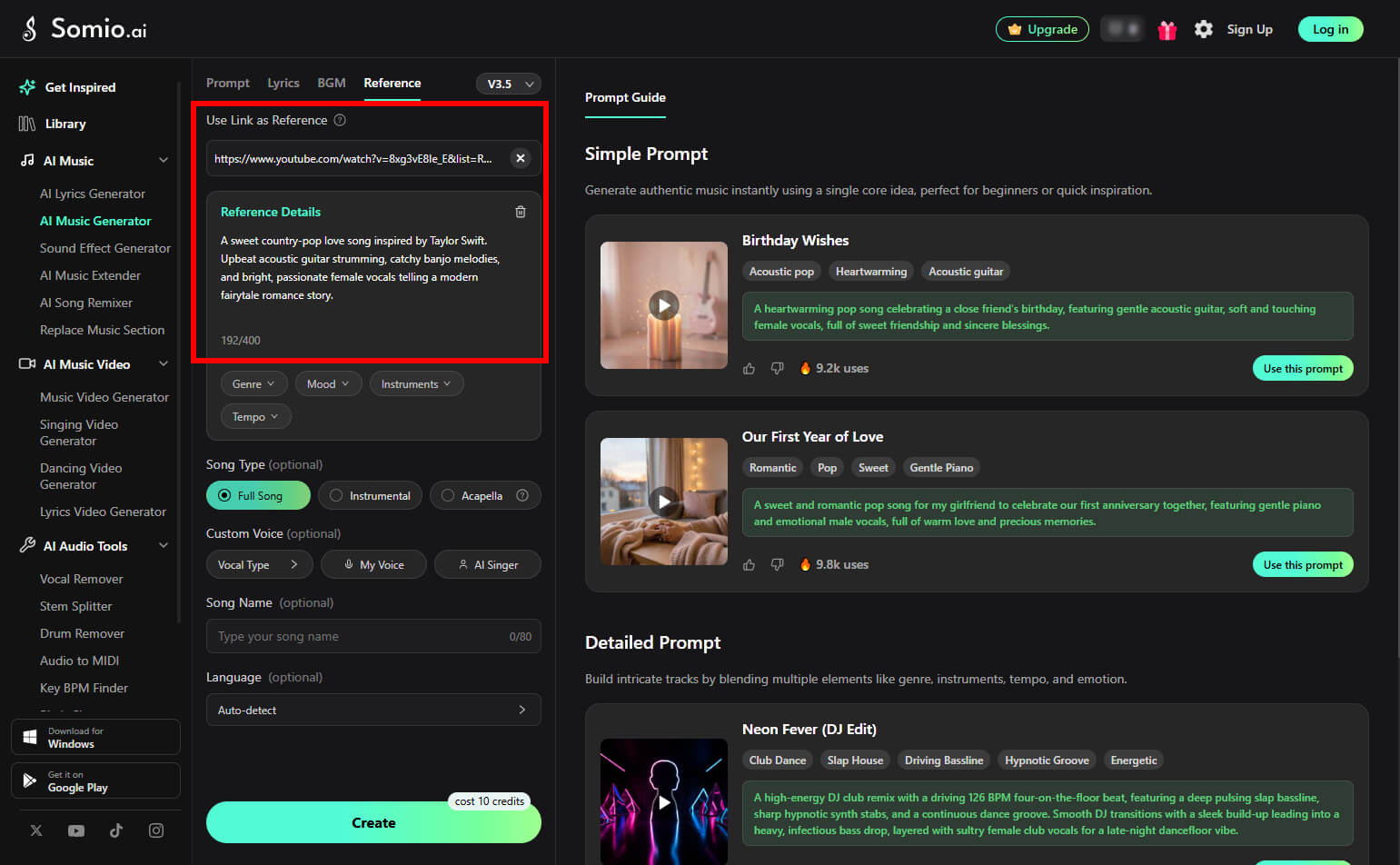
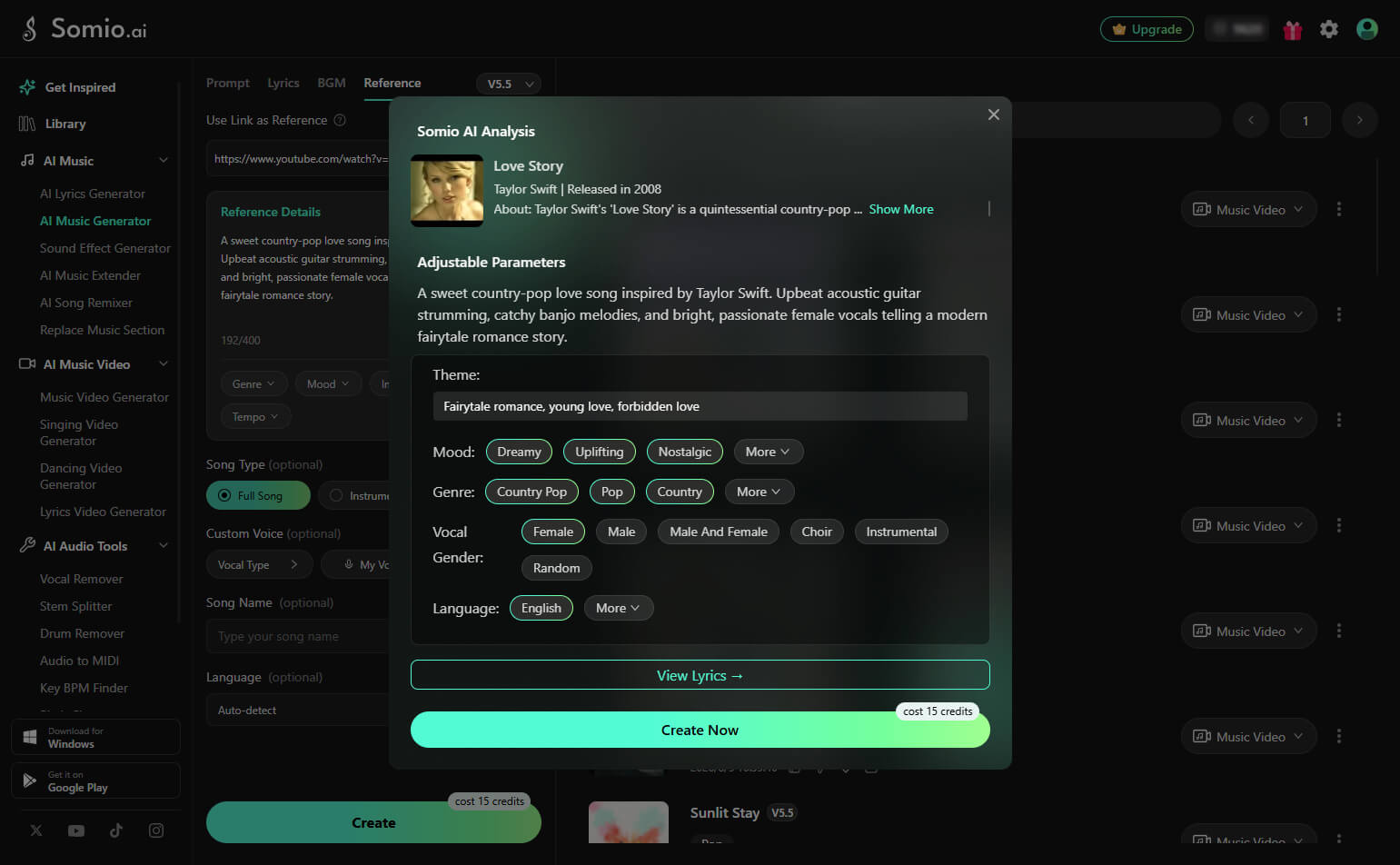
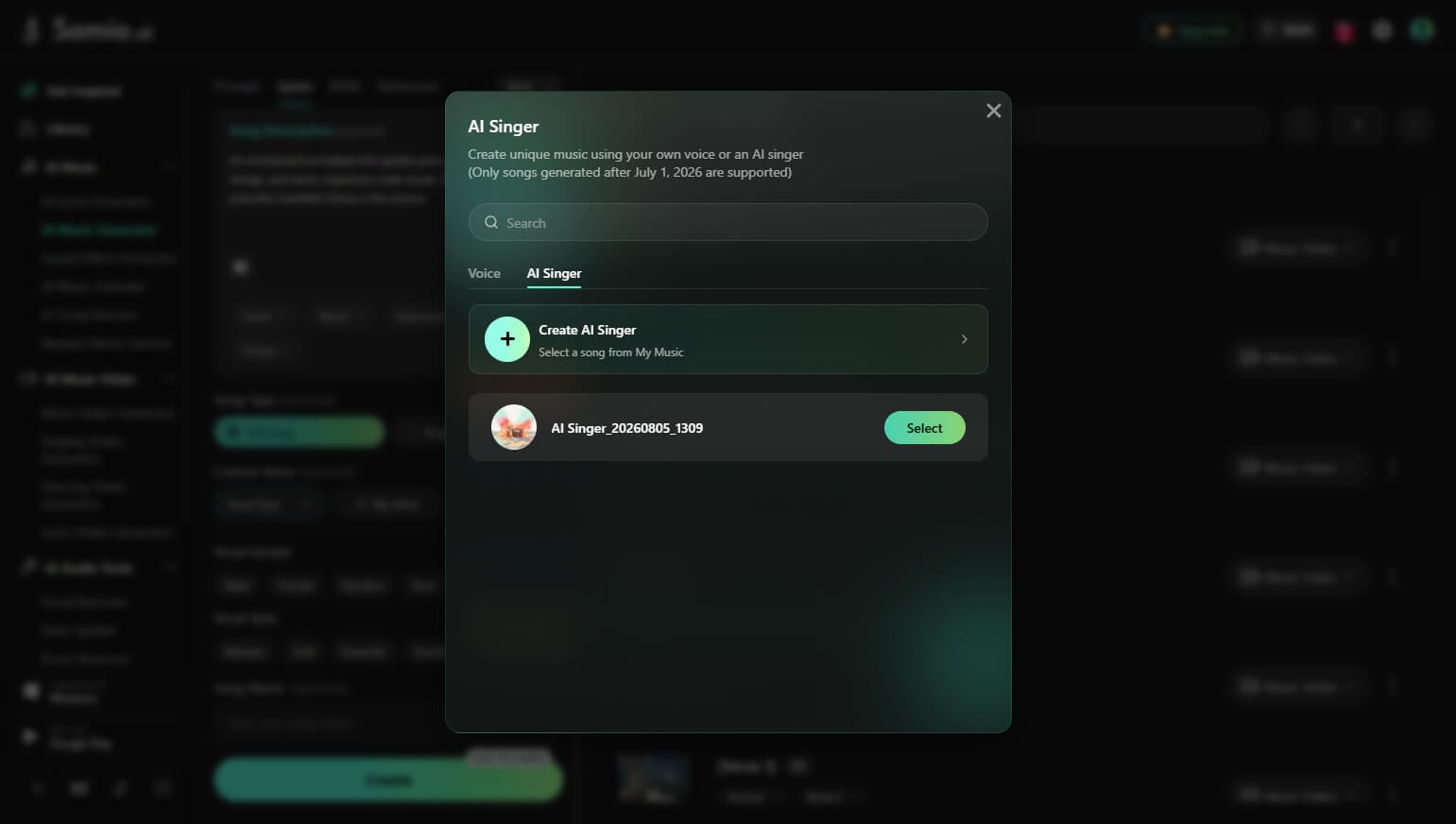
- Step 1Add a Reference Song: Powered by our AI similar song generator, you can start from a sound you already love and generate new music that keeps the exact same mood, pacing, and overall feel. Simply switch to the Reference tab on the Somio free AI music generator and paste a YouTube link of a song you like. Somio will capture its style, mood, and musical elements as inspiration for your new track.
- Step 2Personalize Your Track Style: Add prompts to describe the style, mood, specific instruments, or theme you want. Somio AI song maker will combine your ideas with the reference song's vibe to create a unique version.
- Step 3Create and Export Your AI Song: Click "Create" to generate a unique, customized track based on your reference and prompts. Listen to the results and download your favorite version in MP3 or WAV format.
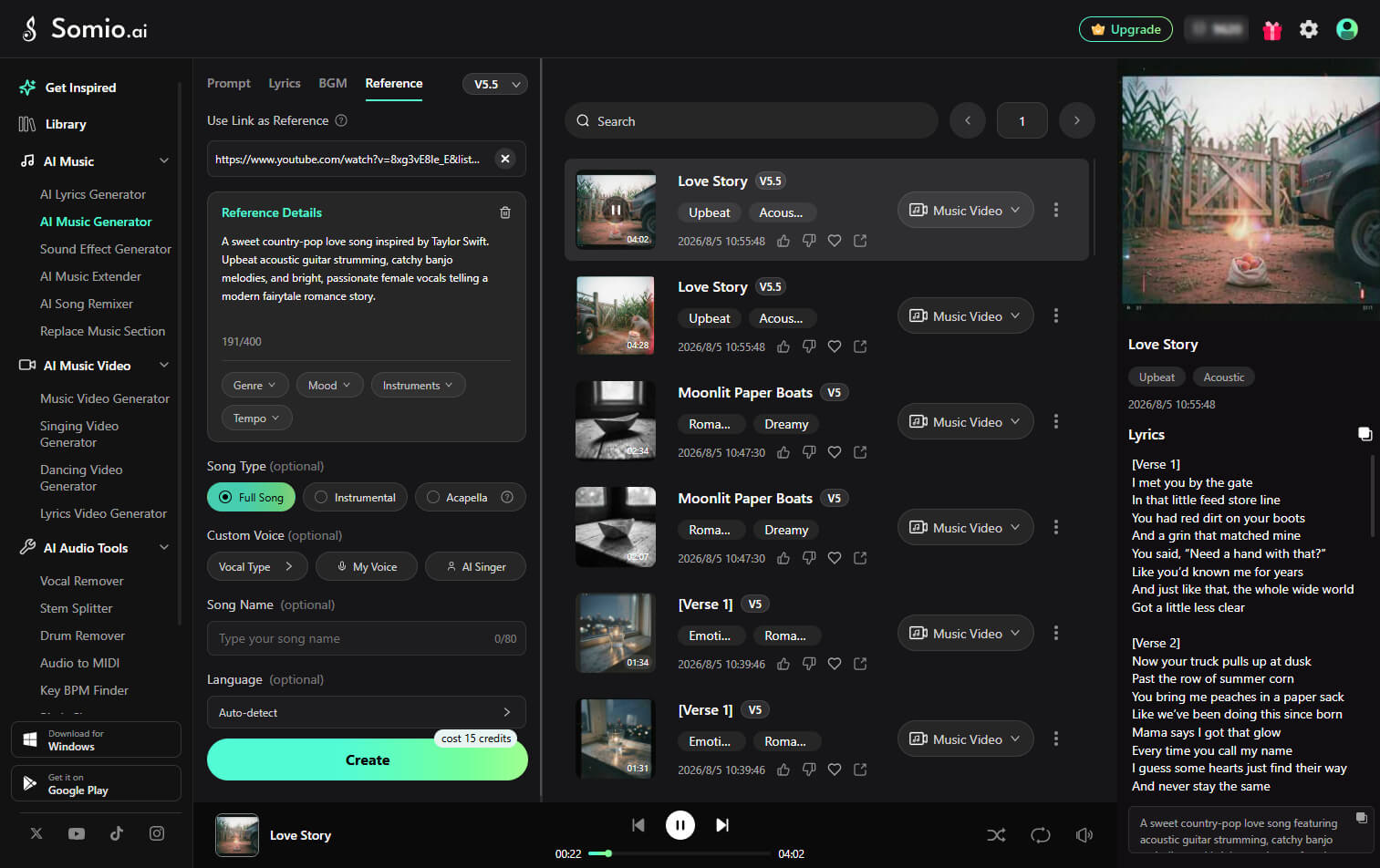
Bonus Feature: Mastering Vocals — How to Use Vocal Types & Custom Voices
To make every song feel more personal, Somio AI song creator lets you customize vocals in different ways when creating full songs, acapella tracks, or similar songs. Choose a preset vocal style, use your own voice, or recreate songs with your favorite AI Singer voice.
Preset Vocal Types: Create the Voice You Imagine
Choose from different preset vocal options, such as Male, Female, or Duet, or describe the exact voice you want with a text prompt. Create unique vocals with specific characteristics, such as a warm acoustic male voice, powerful rock vocals, or dreamy pop female vocals.
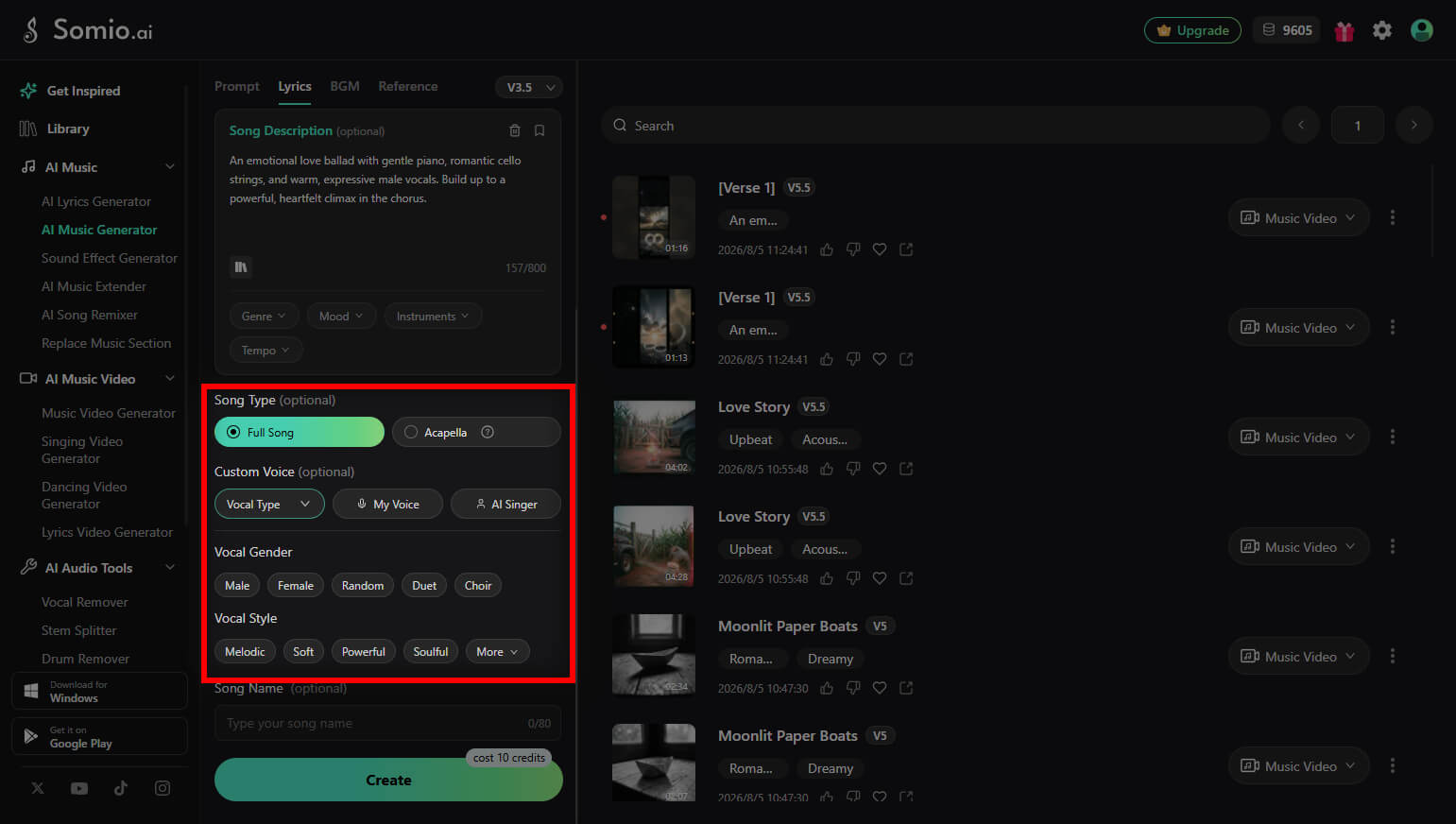
My Voice to Song: Turn Your Voice into a Personalized Song
Want a song that sounds like you? Select "My Voice" under Custom Voice, then record or upload your voice. After verification, Somio AI music maker will transform your voice into a complete song based on your chosen style, mood, and theme.
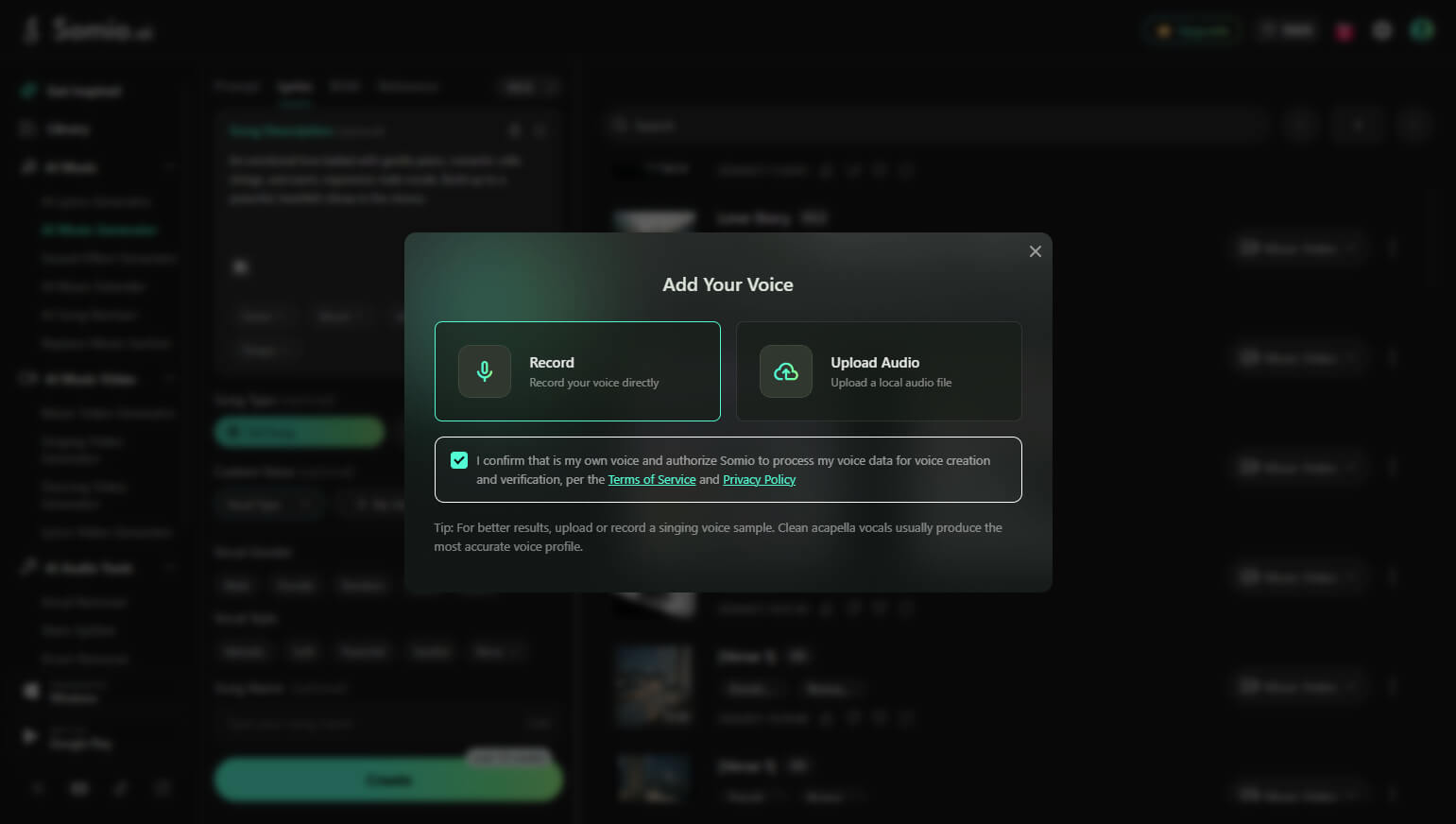
AI Singer Voice: Create Songs with Your Favorite AI Vocal Style
Found an AI singer voice you love in Somio AI-generated songs? Reuse that unique vocal style for your own creations. Select "AI Singer" under Custom Voice, choose your favorite AI singer, then describe your desired song style, mood, or scenario to generate a new track with that voice.
Somio is more than an AI music generator. It helps you turn ideas into complete songs with an all-in-one creative workflow. If you need inspiration or want to write your own lyrics, use the AI lyrics generator to create original lyrics based on your themes, emotions, or concepts before turning them into songs.
Once your song is ready, bring it to life with the AI music video generator. Create engaging visuals that match your music style and turn your tracks into shareable videos for social media, YouTube, and other platforms without advanced editing skills.
Somio also offers powerful AI editing tools to refine your tracks. Extend your songs with AI music extender, create exciting new versions by changing the song's style, lyrics, or vocals with AI song remixer, or separate vocals and instruments with vocal remover and stem splitter. From songwriting and music production to editing and visual creation, Somio gives you everything you need in one AI-powered platform.
Part 4. How to Create AI Music on Android?
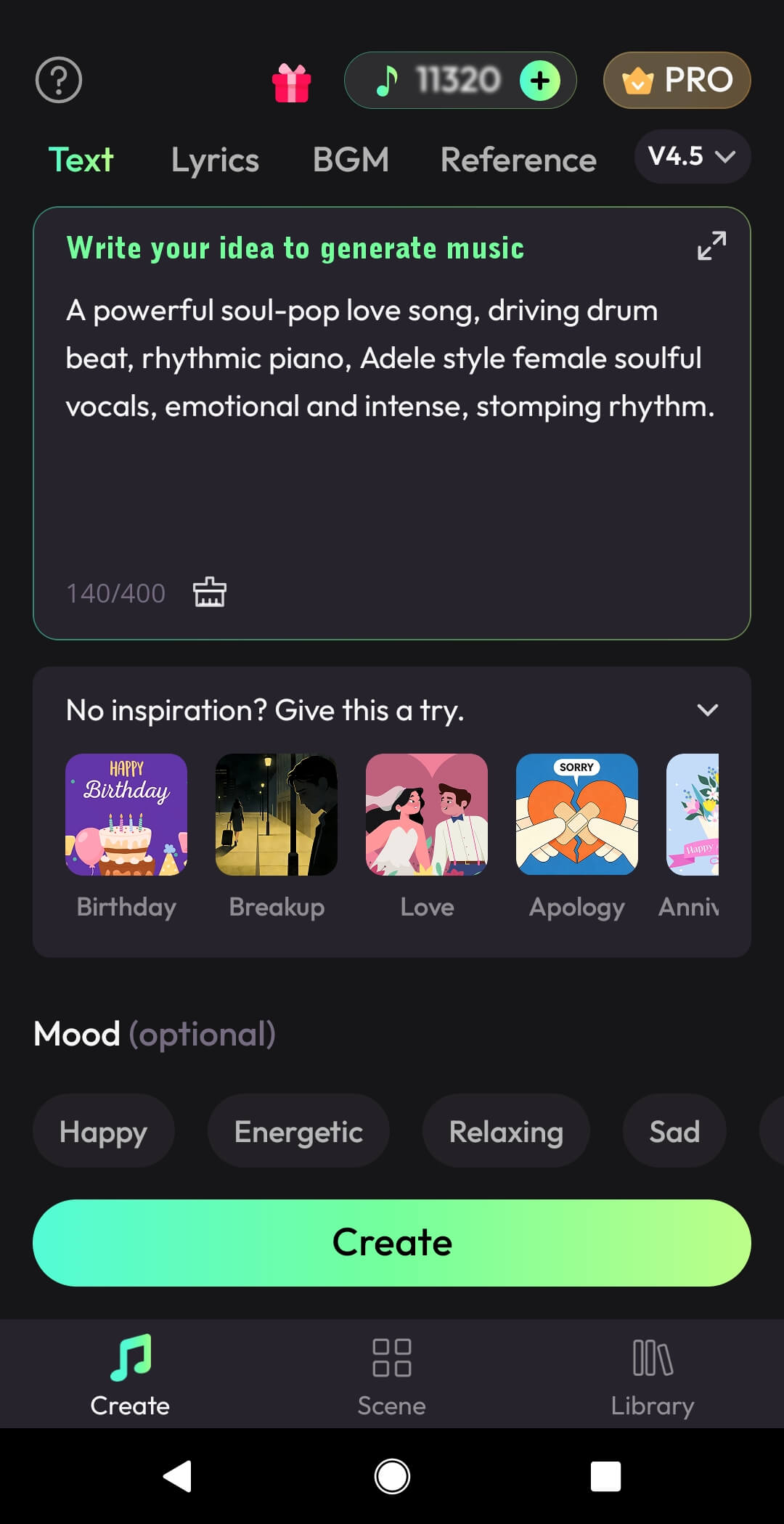
If you prefer creating music on your phone, the Somio AI song generator app works smoothly on Android devices. The mobile version keeps the core features of the web app while offering a touch-friendly workflow for faster creation. It also includes a Reference tab where you can paste a song link as a style reference to create AI music with a similar vibe.
- Step 1
Enter Your Prompt: Start by typing a short prompt describing the song you want, such as" an energetic rap track." This helps the AI music creator understand your idea before it starts generating songs.
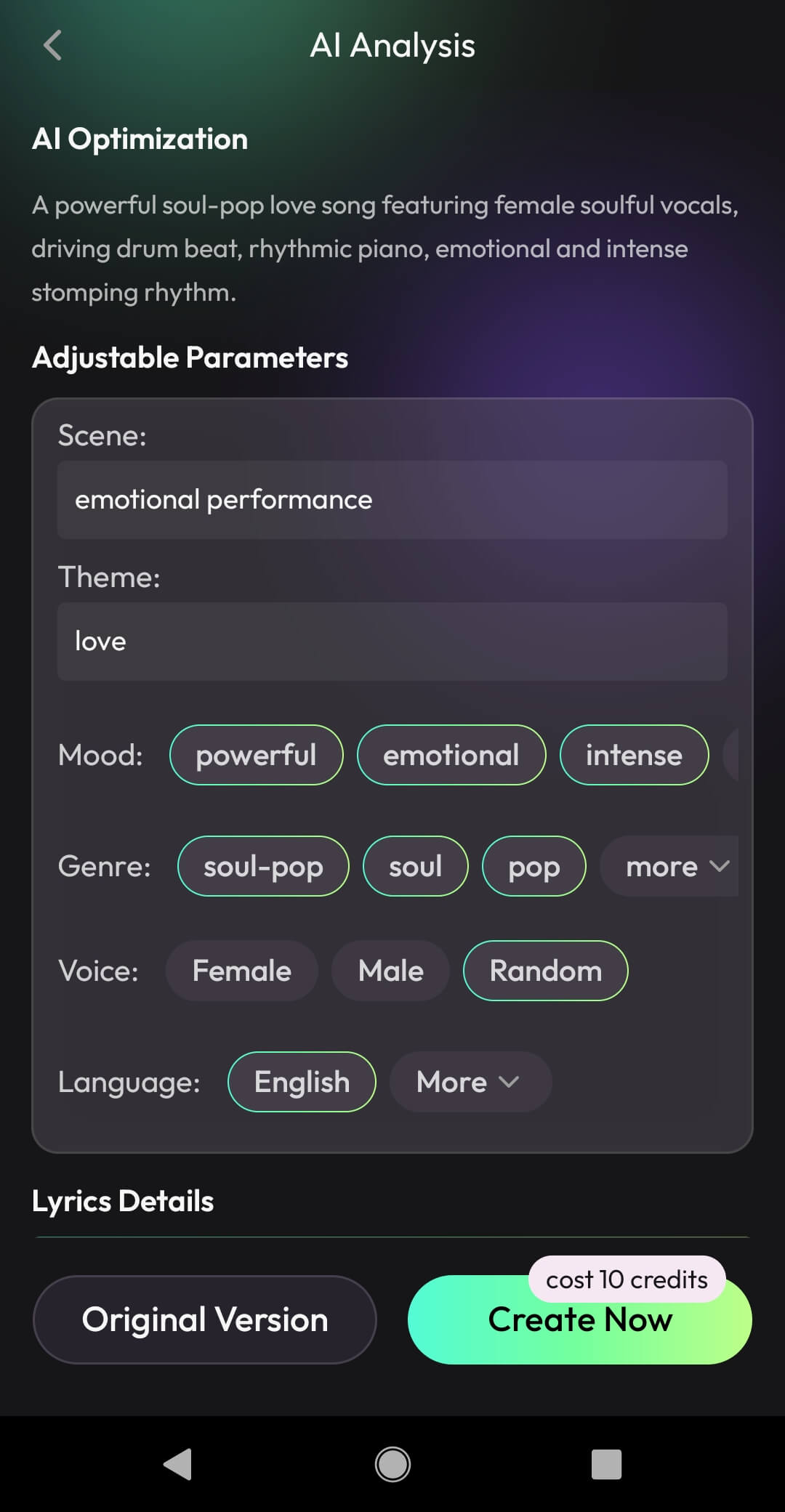
- Step 2
Optimize or Customize Your Song Idea: Next, the AI analyzes your prompt and suggests an optimized version. You can use it directly or edit details like scene, theme, mood, or lyrics. If you prefer, skip optimization and tap "Create Now" to generate music with AI.
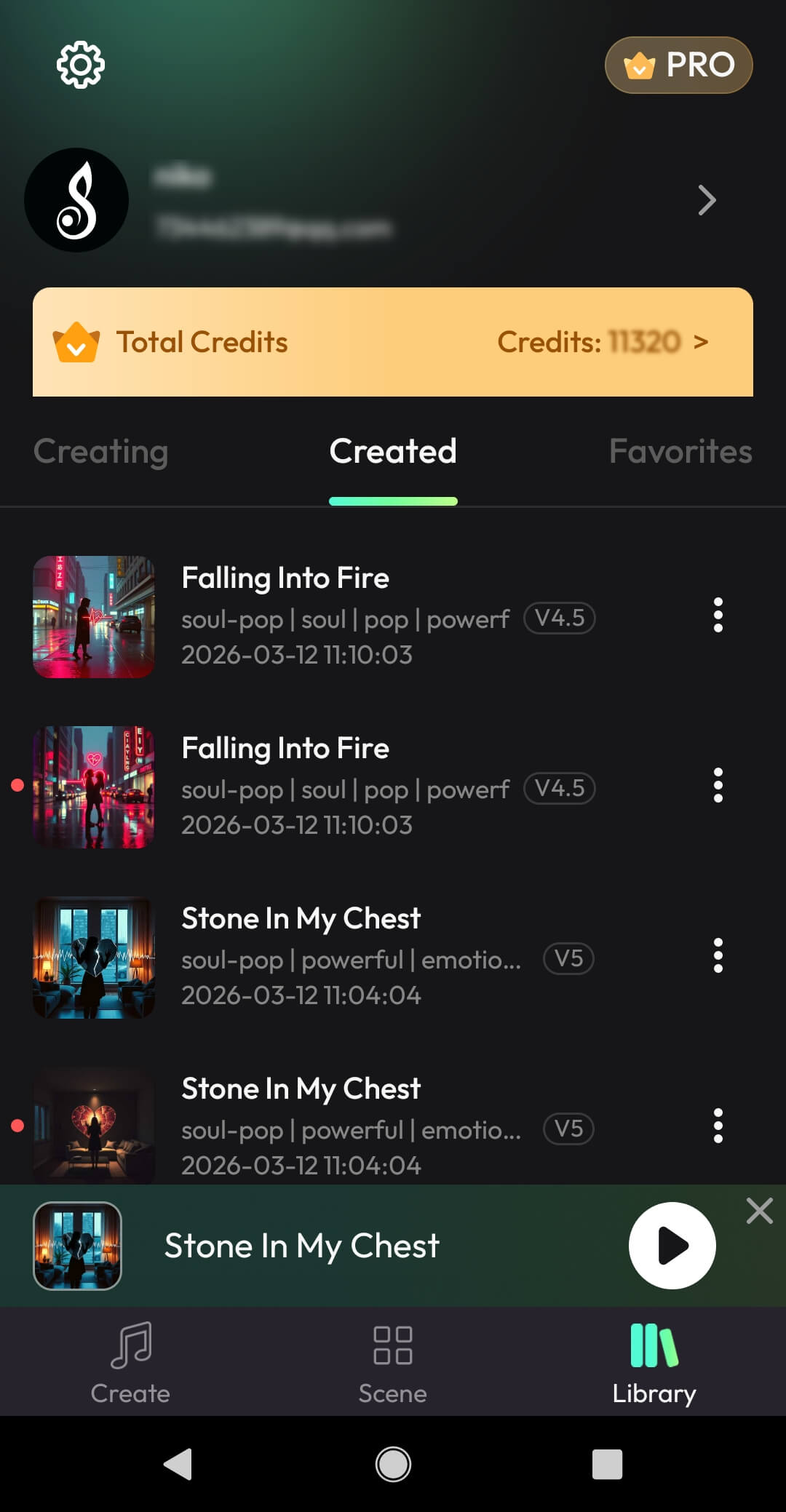
- Step 3
Generate and Choose Your Track: Within seconds to a minute, Somio will generate AI songs for preview. Listen to the results, pick your favorite, then download it as MP3 or WAV, rename the track, recreate variations, or share it instantly online.
Tips: Use a Song Link as a Style Reference
You can also open the Reference tab and paste a link to a song you like. Somio will analyze the style and combine it with your prompt, helping you create AI music that captures a similar vibe while remaining original.
Part 5. 5 Pro Tips to Level Up Your AI-Generated Music
Write Clear and Specific Prompts
When learning how to make AI music, avoid vague requests. Instead, describe the idea with clear musical details so the AI music generator can better understand what you want to create.
A simple prompt structure you can follow is:
Genre/Style + Instruments + Mood + Tempo or Energy + Vocal Direction (optional).
For example: "Lo-fi hip-hop beat with warm piano chords, soft vinyl crackle, mellow drums, nostalgic mood, 80 BPM, instrumental."
Using detailed prompts like this helps the AI generate music that sounds more structured and closer to your creative vision.
Define the Genre, Mood, and Instruments
To create music with AI that sounds more polished, includes musical details like genre, instruments, tempo, and mood. For example, a prompt like "lo-fi hip-hop beat with jazzy piano and soft vinyl crackle" gives the AI a clearer direction when it starts to generate AI music.
Experiment with Multiple Generations
Most tools can generate AI songs in several variations. Try creating a few versions and compare them. Small changes in prompts or settings often lead to noticeably better results when you make songs with AI.
Use Reference Tracks for Inspiration
If the platform supports it, add a reference track to guide the AI. Using an example song can help the system better understand the style you want and generate an AI-generated song that matches your creative direction.
Match Music to Your Project
Think about where the track will be used. Whether you need background music for videos, podcasts, games, or social media, aligning the style and mood with your content will help you create AI music that feels more natural and engaging.
Even if you don't know specific music terminology, you can still create AI music easily. With Somio AI music generator, simply describe the style you want, and the music tool will analyze and refine your prompt automatically, helping you generate results that match your idea more accurately.
Conclusion
Now you know how to make AI music, whether creating songs online or on Android. By applying simple tips and refining your prompts, anyone can craft original tracks for ads, short films, presentations, or personal playlists that match their creative vision.
If you're looking for a powerful yet beginner-friendly tool, Somio AI music generator makes music creation effortless. Its smart prompt optimization and flexible creation modes help turn your ideas into polished, unique songs with just a few clicks.
Ready to bring your ideas to life? Start creating your AI music with Somio today!
Part 6. FAQs about How to Make AI Music
- Is it legal to create AI music?
Yes. Creating music with AI is widely permitted in most regions. What matters most is the platform's licensing policy, which explains how your generated tracks can be used. With the Somio AI music generator, users receive clear usage rights and royalty-free options, making it easier to publish or share AI-generated songs without legal concerns.
- Is AI-generated music royalty-free and safe for commercial use?
In many cases, yes — but it depends on the licensing rules of the AI music tool you're using. Somio AI song generator allows you to create royalty‑free tracks that fit perfectly for commercial projects like videos, ads, podcasts, or social posts. Its transparent licensing ensures you can use and profit from your AI‑generated music with full confidence.
- Can beginners create a song with AI without music experience?
Yes. Somio is designed to help anyone make AI songs without needing music theory or production skills. Beginners can simply describe a style, mood, or theme in plain language, and the Somio's smart AI will automatically turn those ideas into a complete, high-quality song.
- How long does it take to generate a song with AI?
The exact time varies depending on the tool and song complexity. Somio free AI music generator usually creates multiple track options in seconds to minutes, so you can preview, download, or regenerate them immediately.
- What is the best free AI music generator?
Somio stands out as the best AI music generator for many creators because it combines simplicity with powerful AI assistance. You can generate music from prompts or lyrics, customize style and mood, and download royalty-free tracks. Its advanced AI analysis can also refine and optimize your prompts or lyrics, helping produce high-quality songs that match or even exceed your expectations.
- Can I edit the lyrics or regenerate the song?
Yes. Somio free AI song generator allows you to edit the lyrics or text from your original prompt, adjust the style and mood, and regenerate the song. This makes it easy to refine your music and get a better result without starting from scratch.
Prefer watching instead?
Watch the video tutorial.