Want to create a music video but don't have the budget, equipment, or editing skills to make it happen? Traditional music video production often involves expensive cameras, professional editors, and hours of complicated post-production — making it difficult for independent artists and creators to bring their ideas to life.
The good news is that AI is changing the way music videos are created. With an AI music video generator, you can transform a song into engaging visuals by simply using your audio, image, or text prompts. AI music video makers can easily generate scenes, animations, effects, and transitions without requiring advanced editing experience.
In this guide, you'll learn how to make an AI music video, discover the best tools to use, and explore practical tips for creating professional-looking music videos.
Keep reading.
Part 1. What Is an AI Music Video Generator?
An AI music video generator is a creative tool that uses artificial intelligence to turn music, lyrics, images, or text prompts into complete music videos. Instead of spending hours editing clips, matching visuals to beats, or learning complex software, creators can simply provide their ideas, audio, or visual reference and let AI produce visuals, motion effects, scene changes, and cinematic elements that align with the mood and atmosphere of their music.
Think of it as a virtual video production team that handles the most time-consuming parts of the creative process. Depending on the tool, you can create an AI music video from different inputs, including: existing songs, AI-generated music, text prompts, images or album artwork, voice recordings, storyboards, and more.
This makes AI music video generators popular among independent musicians, YouTubers, TikTok creators, digital artists, marketers, and content creators who want professional-looking visuals without a large budget or production team.
Most AI music video tools fall into three main categories. Understanding how each type works can help you choose the right option for your creative goals.
Text-to-Video AI Music Video Generator
Text-to-video tools create video scenes based on written descriptions. You simply describe the visual style, characters, or story you want, and the AI generates matching clips.
They are ideal for creators who want unlimited creative freedom, especially for cinematic stories, fantasy worlds, anime-style visuals, abstract concepts, or unique music video ideas without existing footage.
Image-to-Video Music Video Generator
Image-to-video tools animate existing images, such as album covers, artwork, portraits, or AI-generated illustrations. The AI can add camera movements, character animation, lighting effects, and environmental motion to turn static images into dynamic videos.
This option works well for artists who already have a strong visual identity or want to bring their artwork to life.
Music-to-Video AI Generator
Music-to-video tools focus on automatically syncing visuals with audio. By analyzing elements like rhythm, tempo, energy, and song structure, AI creates scenes and effects that match the music.
This is especially useful for creators who want a complete music video quickly without manually editing every scene.
Now that you understand the different types of AI music video generators, let's explore some of the best tools available today. These AI-powered platforms combine audio, images, and text prompts to help you create professional-looking music videos with stunning visuals more quickly and easily.
Part 2. How to Create a Music Video with Your Existing Music Online?
If you already have a finished song, creating an AI music video is easier than ever. Modern online platforms allow you to upload your music, provide visual instructions, and automatically generate synchronized videos without downloading any software.
Ready to turn your music into stunning visuals? Here are the AI music video generators that can help you make it happen.
Best AI Music Video Generator
With so many AI music video generators available, choosing the right one can be challenging. Some tools focus on short social media clips, while others require advanced editing skills to create professional results. For creators who want a simpler way to turn music into visuals, an all-in-one AI music video generator can save time and effort.
Somio AI Music Video Generator
Somio AI music video maker transforms your music into cohesive, story-driven videos that follow your song's rhythm, mood, and visual direction, unlike general AI video tools that generate disconnected clips. Simply upload your music and visual reference, describe the mood or style you want, and the AI generates cohesive scenes in just seconds to a few minutes — complete with smooth transitions, beat synchronization, character consistency, and cinematic visuals. You can also combine album artwork or AI-generated images to create unique visual storytelling without manual animation.
Somio goes beyond standard music videos to support everything from lyric videos and dancing videos to singing videos, animated clips, and promotional shorts. By moving the entire production process online, it eliminates the steep learning curve for beginners and speeds up the workflow for pros, allowing you to bypass tedious editing and stay focused on your music.
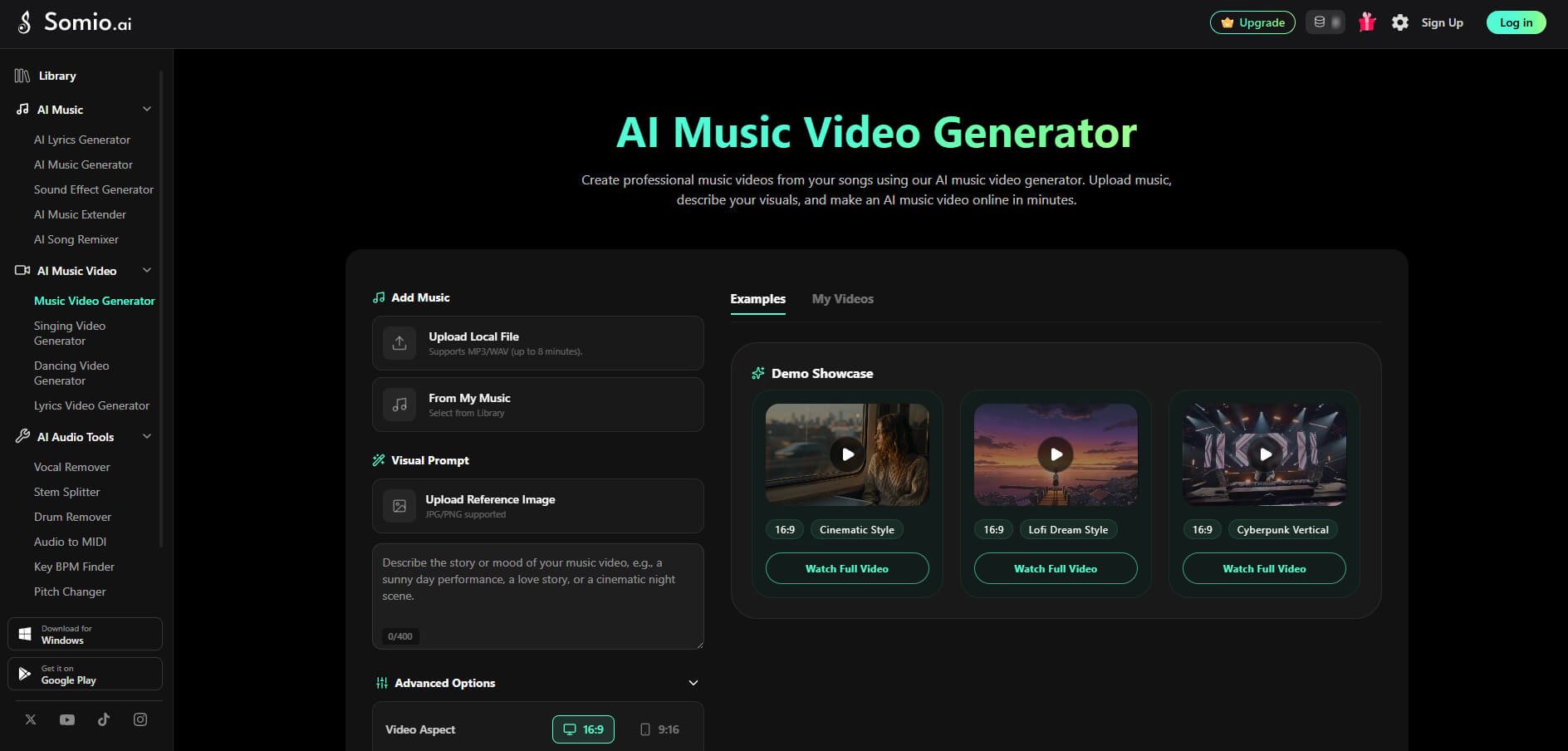
Key Features of Somio AI Music Video Generator:
- AI-generated scenes with consistent storytelling
- Automatic music and beat synchronization
- Cinematic camera movements and transitions
- Support setting clip duration in real time
- Consistent characters across every scene
- Supports audio, images, and text prompts
- HD video export up to 8 minutes
- Professional results without editing skills
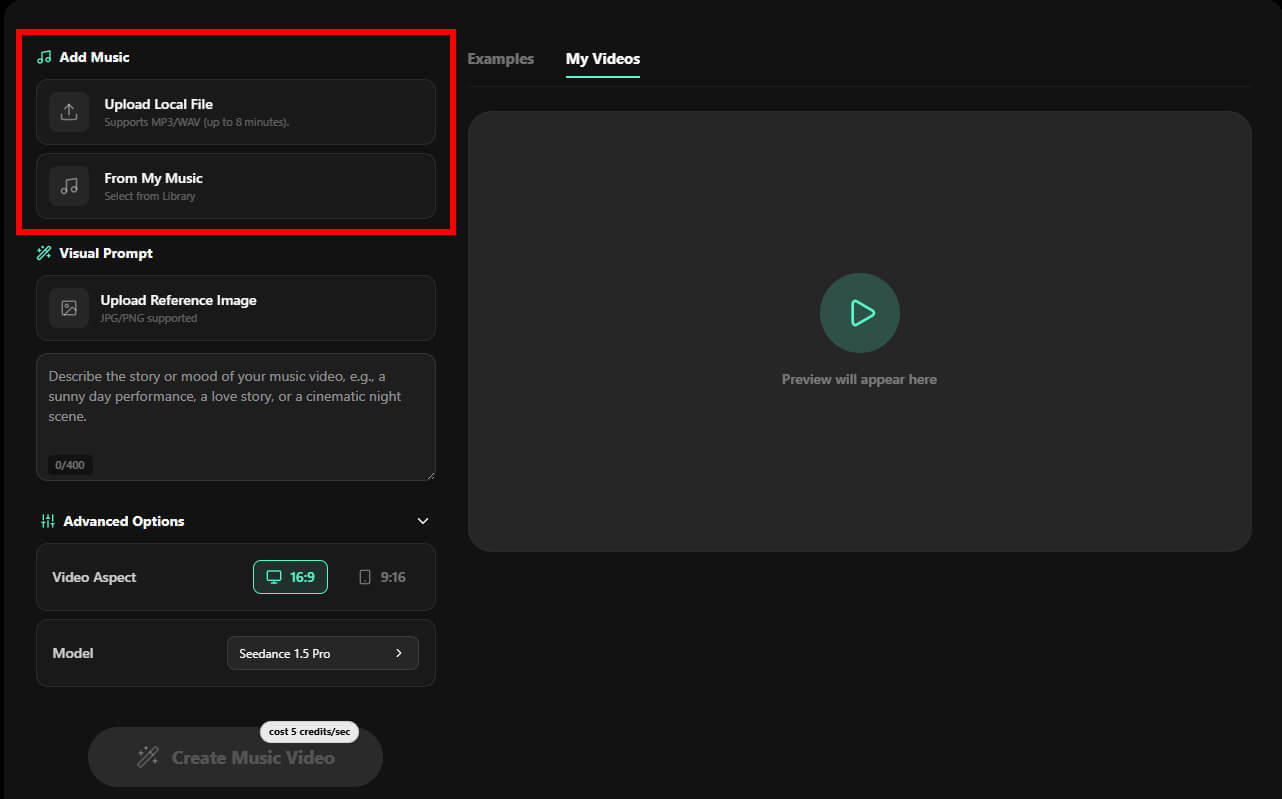
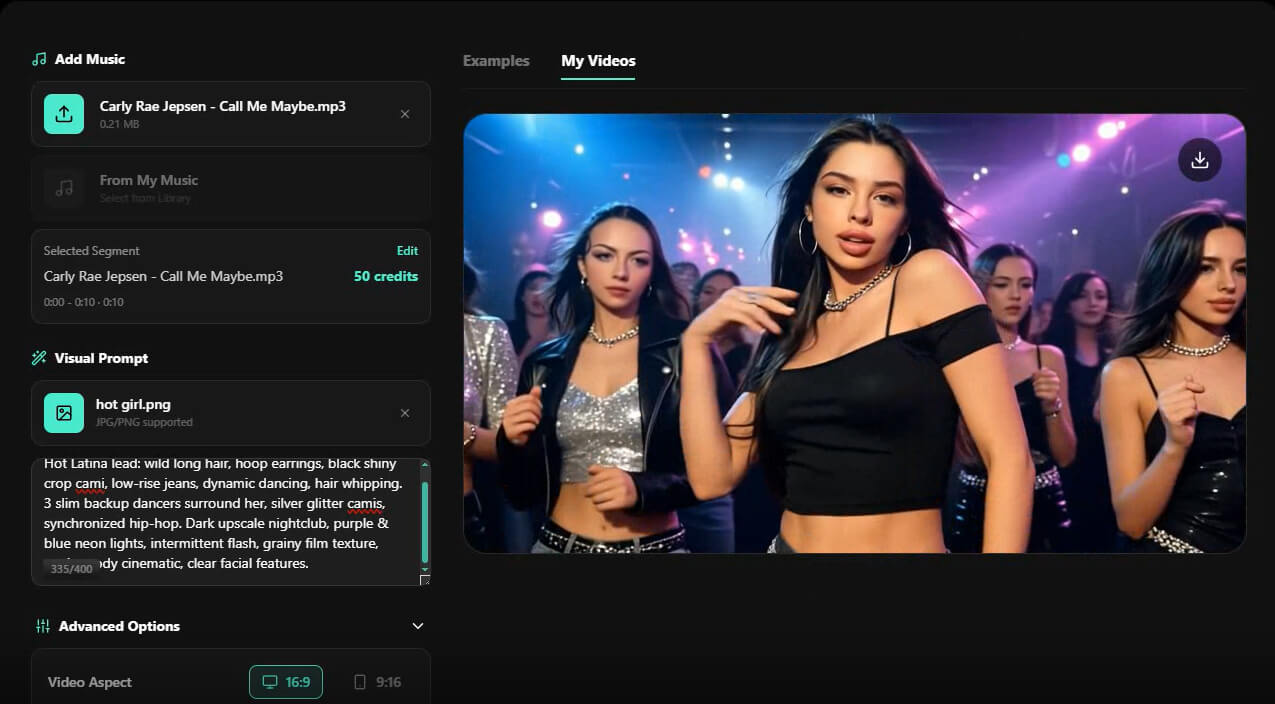
- Step 1Upload Your Favorite Music: Head to Somio music video maker, upload your own MP3 or WAV file, or choose a track from Somio's built-in AI music library. After importing your audio, simply select the section you want to visualize. Somio supports music videos up to 8 minutes, making it suitable for everything from short clips to full-length songs.
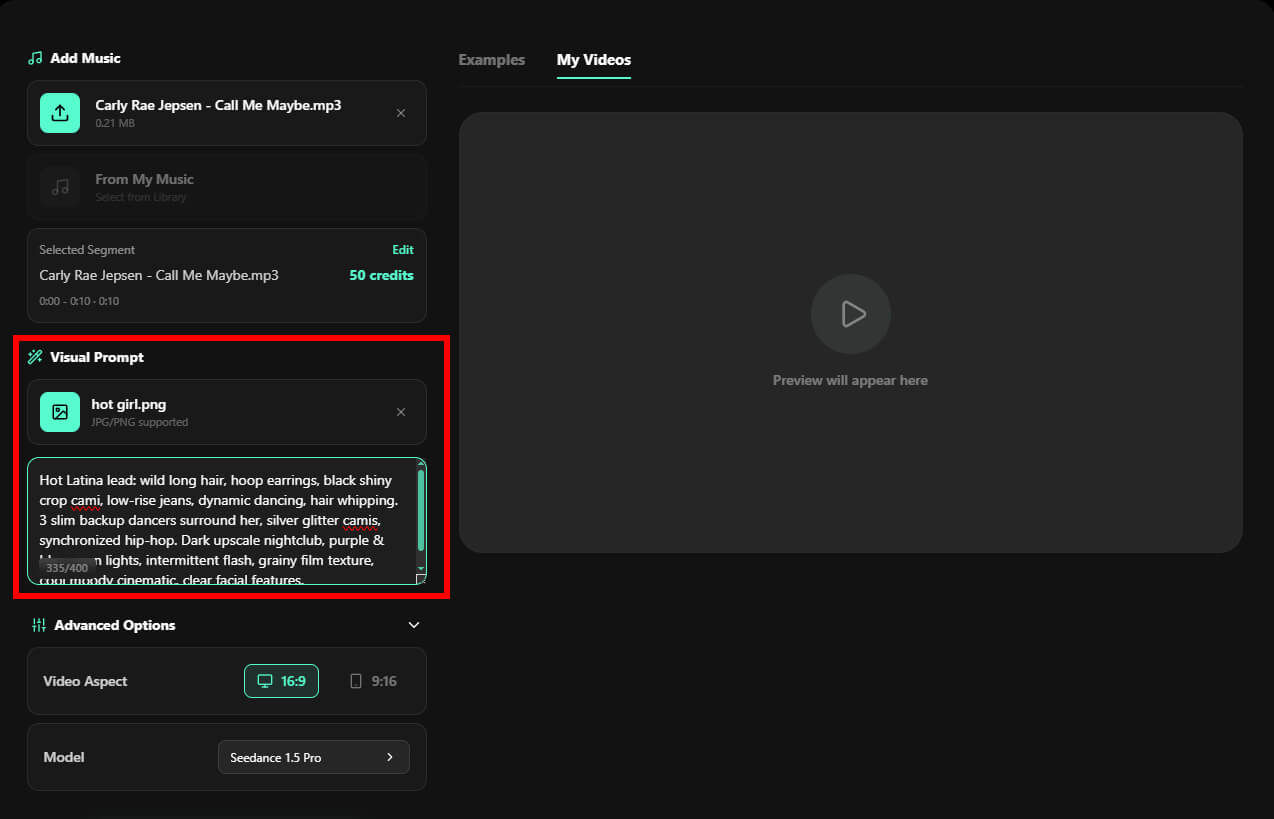
- Step 2Describe Your Visual Ideas: Add a reference image (or generate one directly within Somio), then write a prompt describing your preferred scenes, style, mood, or artistic direction to guide the AI music video creator. Whether you're aiming for cinematic storytelling, animated visuals, live-performance footage, or fantasy-inspired artwork, Somio generates cohesive scenes that match both your music and creative vision.
- Step 3Configure and Make Your Own Music Video: Choose the aspect ratio (16:9 or 9:16) that fits your platform, select your preferred AI model, and click "Magic Generate." Somio music video maker automatically creates a beat-synced music video with smooth transitions and polished visuals. When the generation is complete, preview your video, download it in HD, or publish it directly to platforms like YouTube, TikTok, and Instagram Reels.
Other AI Music Video Generators Worth Checking Out
While an all-in-one workflow can significantly simplify the creative process, different creators may have different priorities. Some artists look for cinematic storytelling, while others need short-form social content, animated visuals, or unique artistic styles. Fortunately, the growing AI music video landscape offers several excellent options, each with its own strengths.
If you're exploring AI music video generators beyond Somio, the following tools are worth considering to find the right fit for your creative goals.
Freebeat.ai
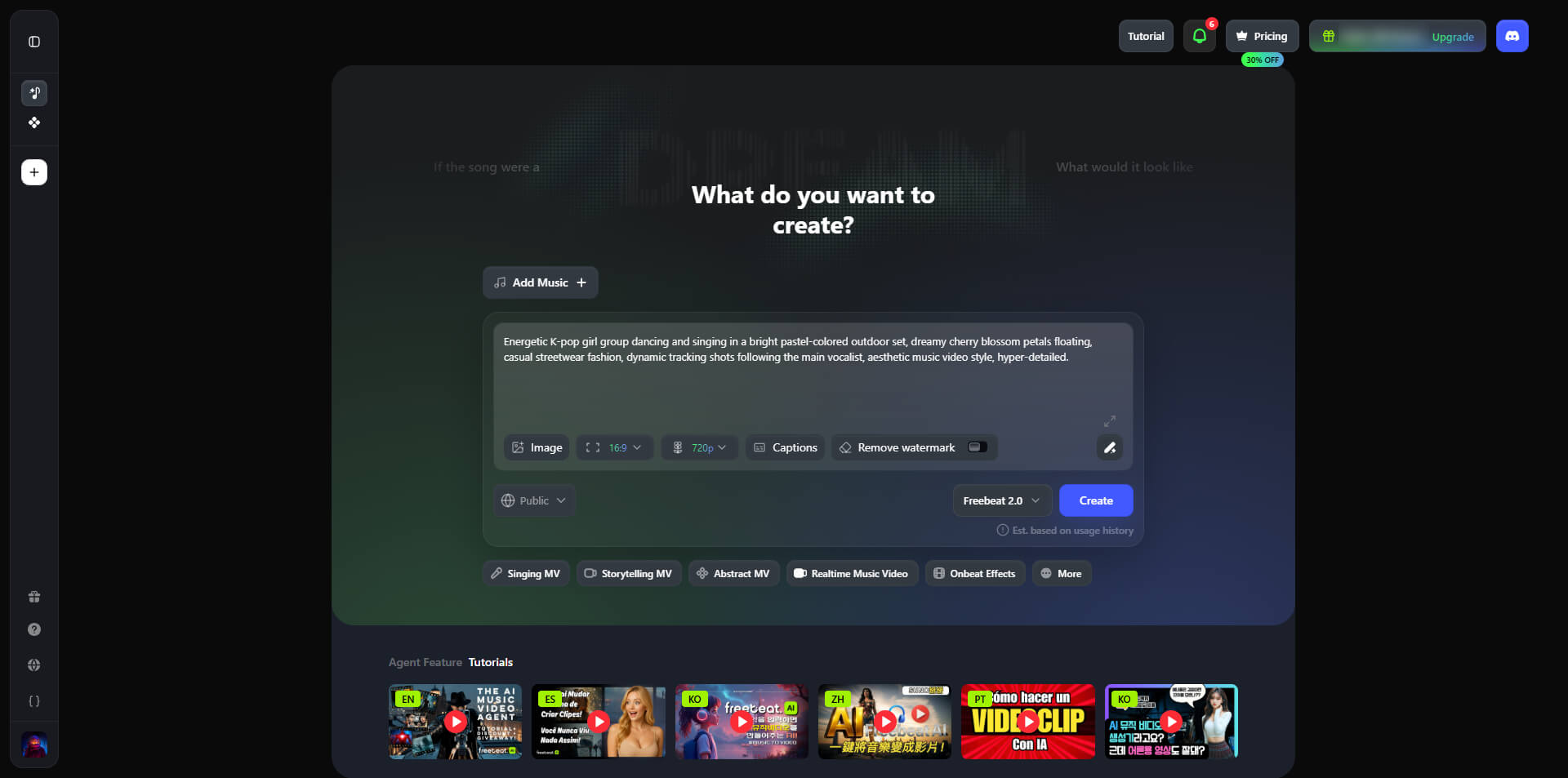
For creators who need to turn songs into social-ready videos instantly, Freebeat.ai music video maker offers a highly automated, AI-powered workflow. Instead of adjusting every single clip manually, you can upload a track or paste a link directly from YouTube, enter a few prompts, then let the music video creator generate beat-matched dancing videos, singing videos, and promotional shorts in one click.
Its beginner-friendly design virtually eliminates the learning curve for rapid content creation, featuring dedicated modes for auto-timed lyric videos and cinematic storytelling that moves in perfect rhythm.
Pika
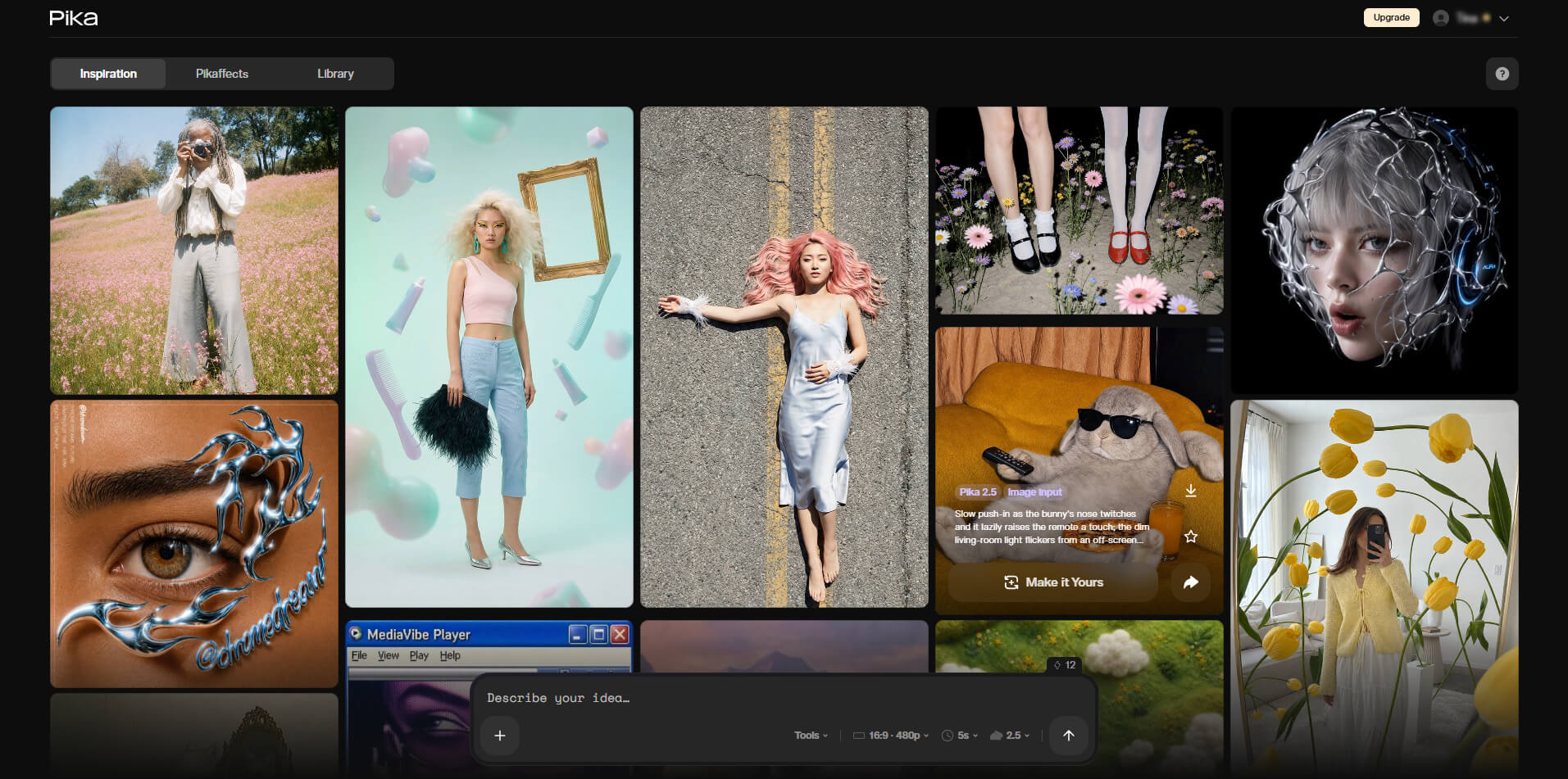
Pika is a strong choice for musicians who want to add artistic and cinematic elements to their music videos. With prompt-based generation, the AI music video generator transforms ideas into visually striking clips featuring dynamic camera movements, creative effects, and unique character animations. While it works best for generating individual scenes rather than full music videos, Pika helps artists create eye-catching visuals, B-roll footage, and imaginative sequences that are difficult to capture in real life.
Kaiber
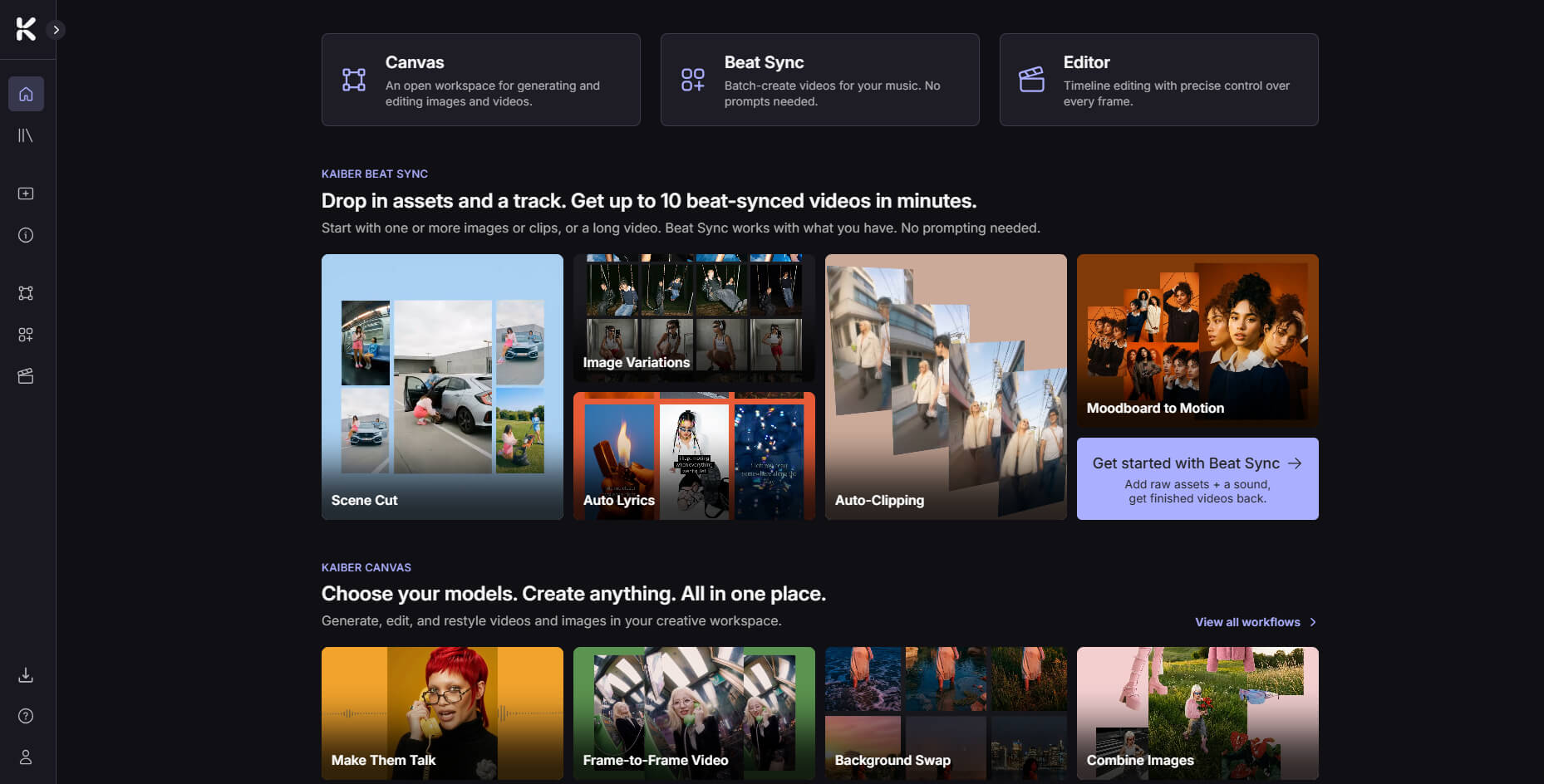
Kaiber is built for creators who want their music videos to feel more artistic, imaginative, and visually unique. Its Audio Reactivity and Beat Sync engines analyze your track's energy, automatically evolving visuals in sync with the rhythm and mood. Combined with image animation, text prompts, and style references, Kaiber transforms static artwork into dynamic sequences, helping musicians create memorable visuals for concept albums, promotions, and experimental projects.
Although each AI music video generator has its own strengths, many creators still face the challenge of managing multiple tools during production. Creating a complete music video often means generating music in one platform, designing visuals in another, and using separate software for animation and editing. This fragmented workflow can slow down the creative process and make it harder to maintain visual consistency.
Somio music video maker simplifies this experience by bringing AI music generation, AI music video creation, image animation, and synchronized storytelling into one seamless workflow. Instead of switching between different applications, creators can develop their ideas, generate visuals, and complete polished music videos directly from a single browser-based platform.
Part 3. How to Create a Music Video If You Don't Have Music?
Many creators believe that making an AI music video starts with having a finished song ready. However, that is no longer the only way to create it. Today, AI music generators allow you to create personalized music based on your ideas, making it possible to start a complete music project from scratch.
Whether you are a beginner exploring music creation, a content creator who needs original background tracks, or an artist looking for new ways to express ideas, an AI music generator can help turn your concepts into custom songs within seconds. You can now go from a simple idea to a complete music video without recording instruments, hiring singers, or managing complicated production steps.
Somio AI music generator lets you create original music through text prompts or lyrics, customize genre, mood, and vocals, or use a YouTube link as a reference. In prompt mode, you can also record your own voice to personalize the output. Generate complete songs with vocals, instrumental tracks, or vocal-only versions in just seconds, then preview or download your creation instantly. Once your track is ready, turn it into a synchronized AI music video in the same workflow — saving time and effort.
With Somio, this entire workflow becomes even easier. You can first create personalized music with the built-in AI music generator, then transform that track into a synchronized AI music video, all within one platform. Let's explore how to make a music video from an original idea.
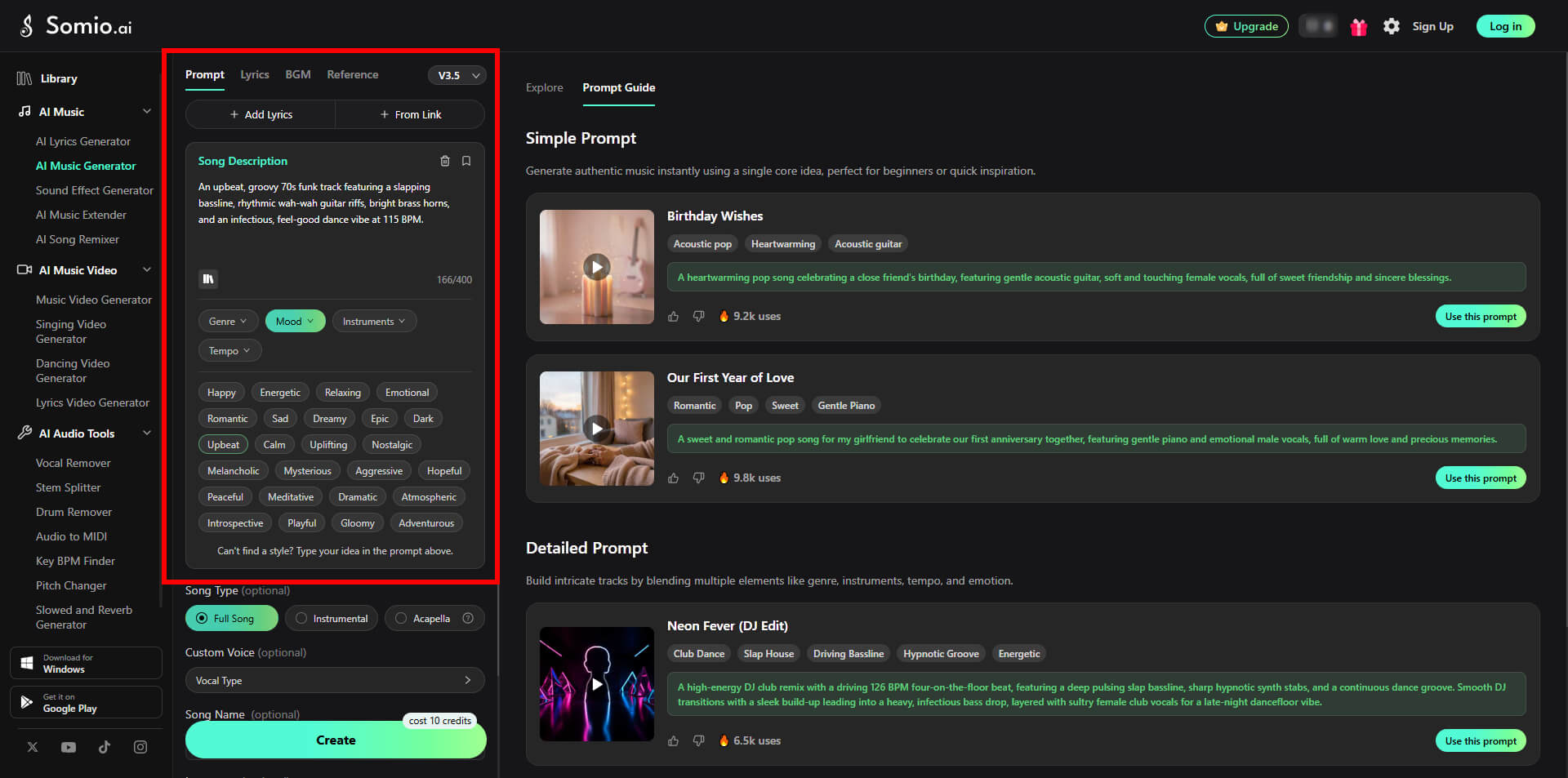
- Step 1Create Your Original Music Idea with Somio: Head to Somio AI music maker, it gives you multiple ways to begin: describe an idea with prompts, turn lyrics into a song, or use reference tracks for inspiration. For instance: You can type a prompt like: "An upbeat, groovy 70s funk track featuring a slapping bassline, rhythmic wah-wah guitar riffs, bright brass horns, and an infectious, feel-good dance vibe at 115 BPM."
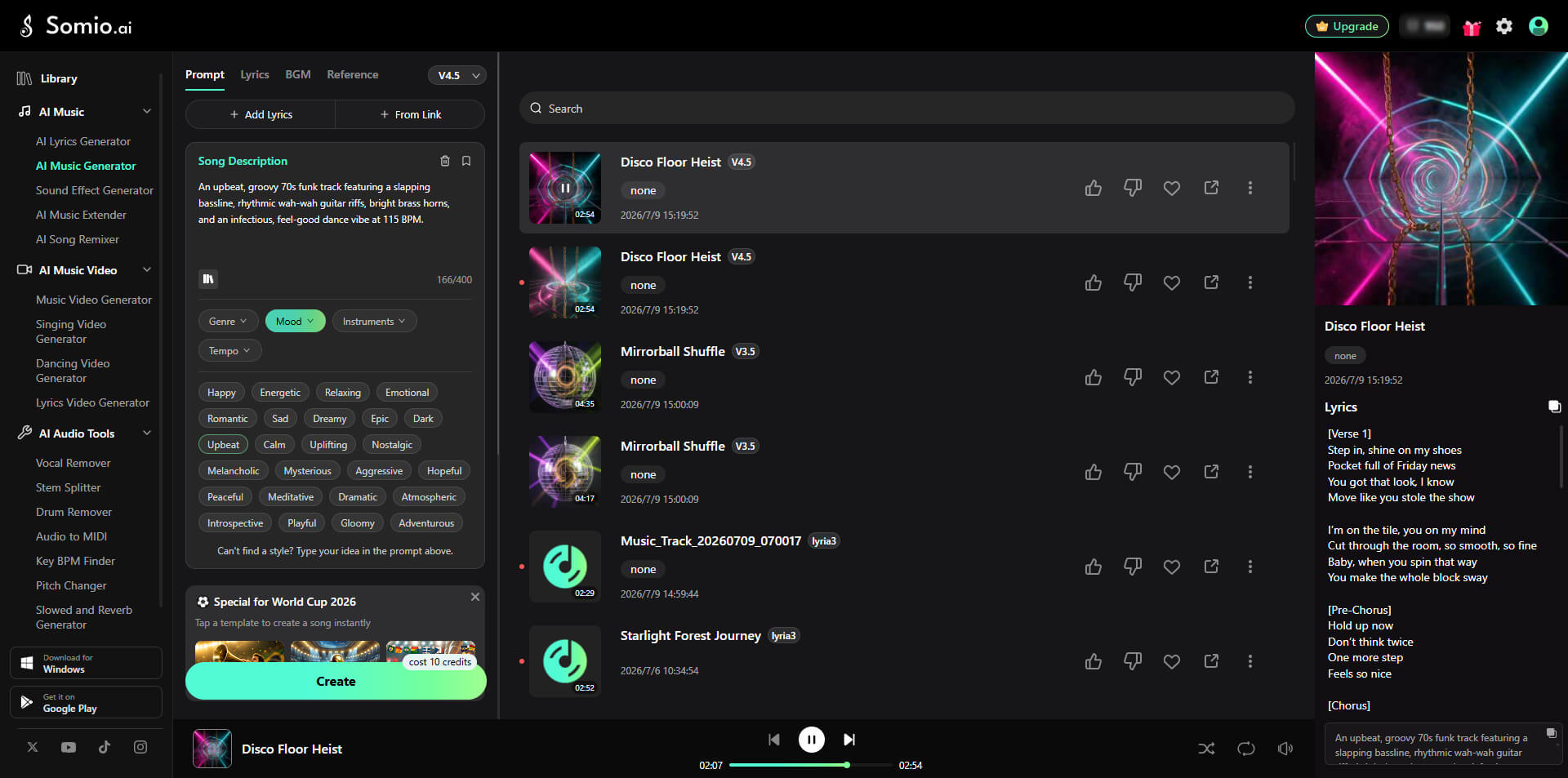
- Step 2Customize Music Style and Generate Your Song: Refine your track by selecting the genre, mood, vocals, instruments, tempo, and song type that best fit your idea. Once everything is set, click "Create" to generate a complete song in seconds. You can create full songs with vocals, instrumental tracks, or acapella versions, then preview, download, or save them to your library for later use.
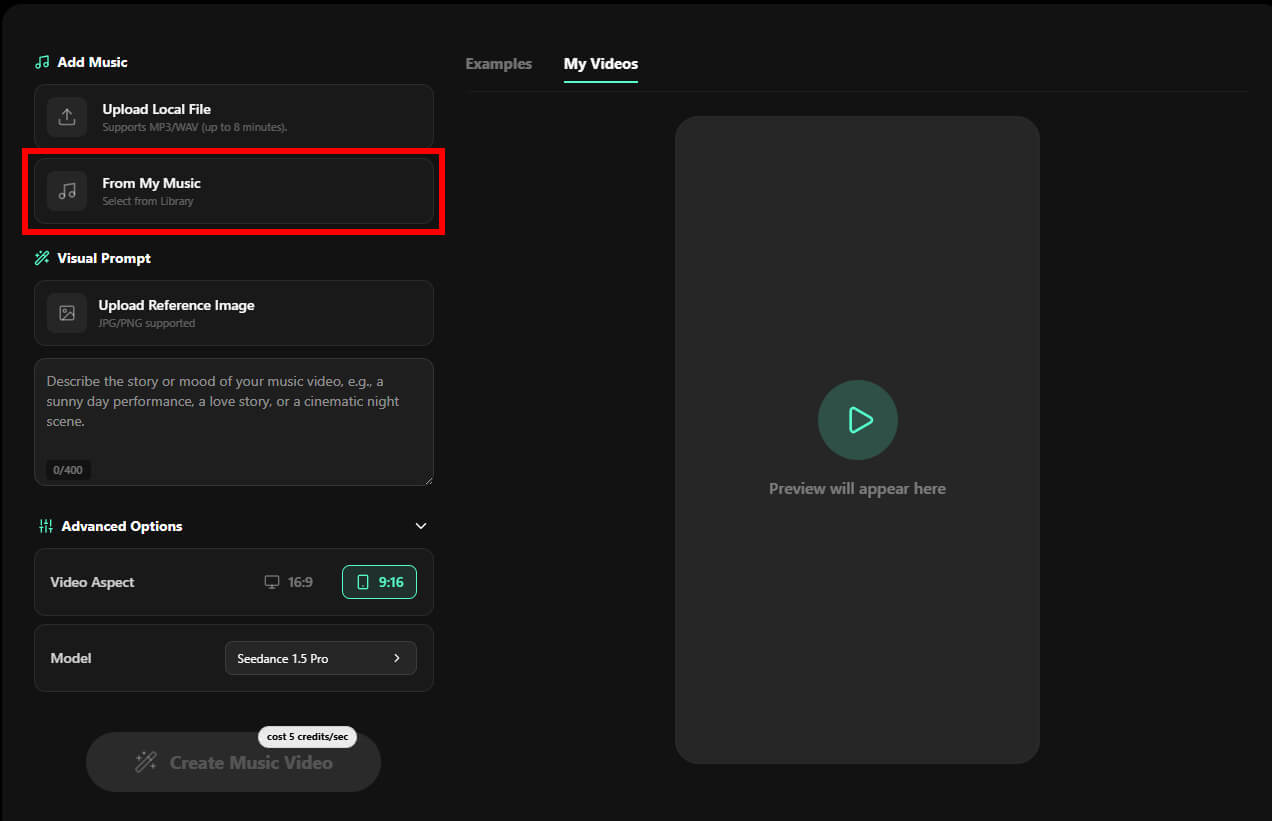
- Step 3Choose the AI-Generated Song from the Library: After creating your track, move directly into music video production without exporting files between tools. Add music from My Music (Somio's library) to pick the track you just created.
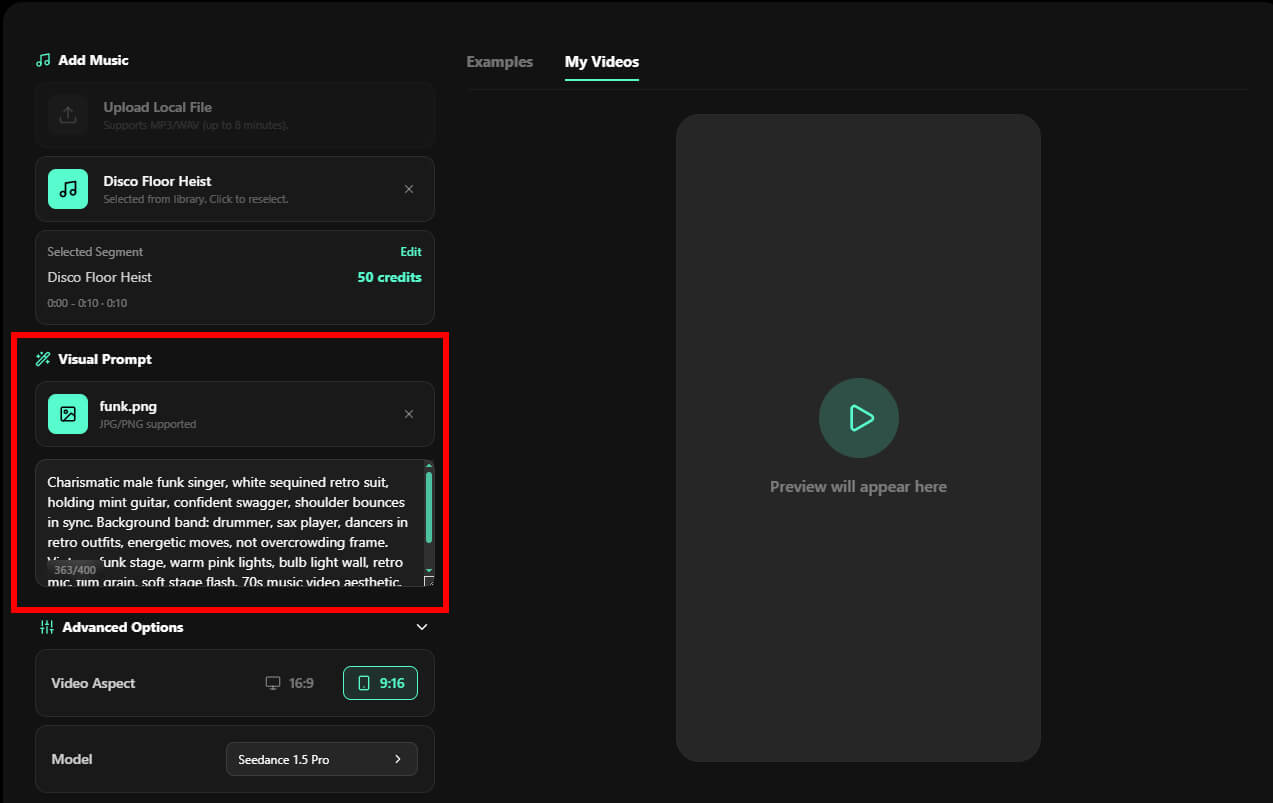
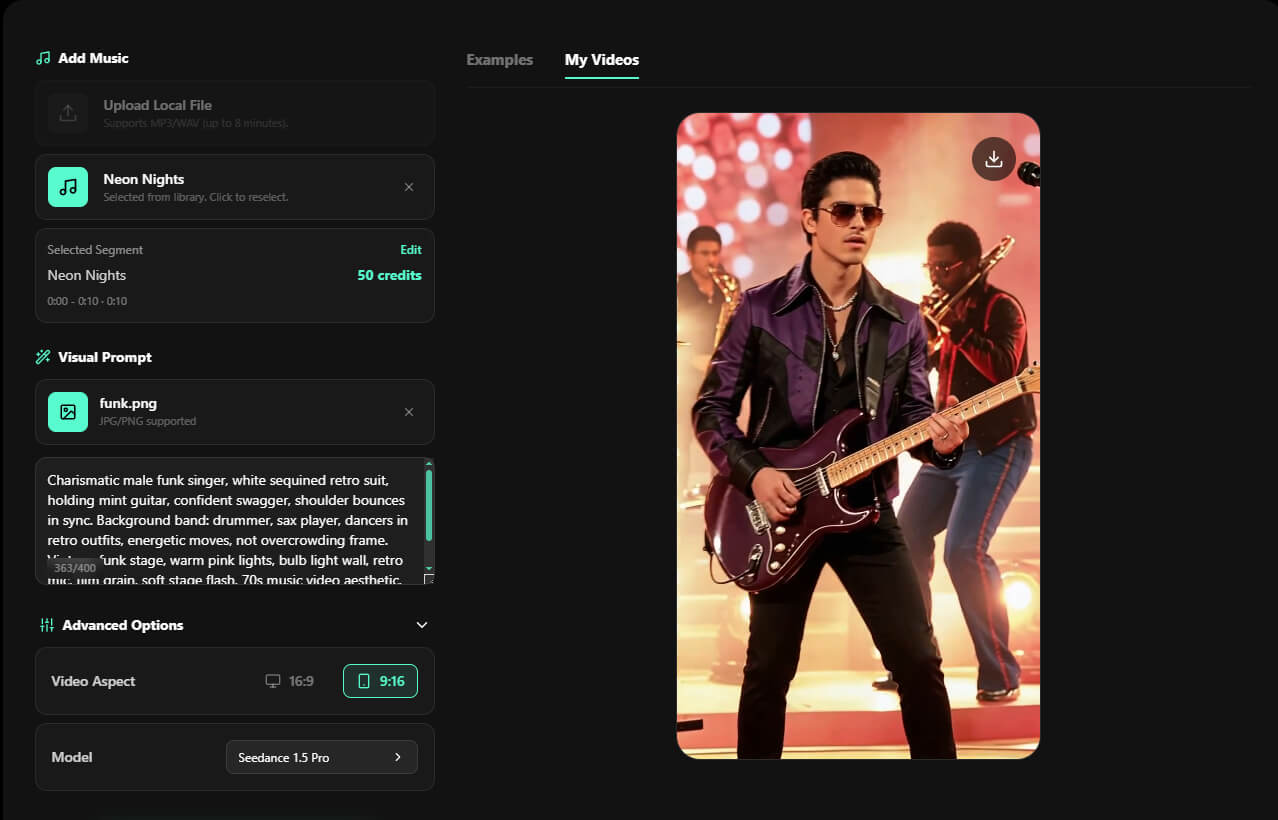
- Step 4Describe Your Visual Story: Your prompt guides the look and feel of the final video. Describe characters, environments, camera movement, lighting, and style to help Somio create consistent visuals. Then, upload a reference image to maintain character identity and achieve more professional storytelling results.
- Step 5Make a Music Video with AI: Choose the aspect ratio and AI model that best fit your target platform, then click "Magic Generate." Somio AI music video generator automatically analyzes your song's rhythm, structure, and mood, transforming your music, prompts, and reference images into a synchronized music video. Within minutes, your video is ready to preview, download, or share across your favorite platforms.
Part 4. Tips for Elevating Your AI Music Videos for Professional Results
Creating an AI music video has never been easier, but standing out still requires thoughtful creative decisions. Strong prompts, consistent visuals, and music-aware editing can make the difference between a video that feels generic and one that truly captures your audience's attention. The tips below will help you create more polished, engaging, and professional-looking AI music videos.
1. Start With a Clear Creative Direction. Many beginners jump straight into video generation without deciding what story or emotion they want to communicate. As a result, the AI often produces beautiful scenes that don't feel connected. Before writing your prompt, think about the mood, characters, and overall visual style you want throughout the song. A clear creative direction gives every scene a purpose, helping your music video feel more cohesive and memorable from beginning to end.
2. Give the AI More Than a Simple Prompt. Short prompts rarely provide enough information for the AI to understand your vision. Instead of describing only the subject, include details such as the environment, lighting, camera movement, artistic style, colors, and mood. The more context you provide, the easier it is for the AI to generate cinematic visuals that closely match your expectations while reducing the need for repeated generations.
3. Keep Your Visual Style Consistent. Switching between different artistic styles or changing character appearances throughout a video can make the final result feel disconnected. Choose a consistent visual direction and maintain it across every scene. If your video features the same character, upload a high-quality reference image to improve continuity. Consistent visuals make your music video look more professional and create a stronger viewing experience.
4. Provide Clear Visual References. Reference images play an important role in guiding AI video generation. Use sharp, high-quality images whenever possible, as blurry or low-resolution references can lead to inconsistent results. Better input helps the AI produce cleaner visuals, stronger character consistency, and higher overall video quality.
From turning an existing track into a visual masterpiece to crafting original music entirely from scratch, the right tool changes the game. Somio seamlessly unifies AI music production, video generation, and built-in editing features into a single, intuitive workflow, allowing you to transform your creative ideas into polished, professional music videos directly from your browser.
Part 5. What Are the Benefits of Creating a Music Video with AI?
AI has made professional music video production faster, more affordable, and accessible than ever before. Instead of relying on expensive equipment, editing software, or large production teams, creators can generate high-quality videos from simple prompts, music, and reference images in just minutes.
The biggest advantage is efficiency. AI music video generator automates tasks like scene generation, beat synchronization, and visual effects, allowing you to focus on storytelling rather than technical editing. It also significantly reduces production costs while making cinematic visuals achievable for independent musicians and content creators.
Beyond saving time and money, AI removes creative limitations. You can easily create imaginative worlds, stylized animations, or performance videos that would be difficult or expensive to film in real life. Most AI music video generators also support multiple aspect ratios, making it easy to publish optimized videos across YouTube, TikTok, Instagram Reels, Spotify Canvas, and other platforms. Many platforms, including Somio's free AI music video maker, also provide commercially licensed AI-generated content, allowing you to use your music and videos on social media, in marketing campaigns, and other commercial projects with confidence.
It's Your Turn to Make an AI Music Video
Creating a professional music video is no longer limited by budget, production experience, or a complete creative team. Whether you already have a song or only a simple idea, AI makes it possible to turn your concept into a finished music project with visuals that match your vision.
With Somio AI music video maker, you can either transform an existing song directly into a synchronized AI music video or start with a simple idea, generate an original track, and bring it to life with matching visuals through one seamless workflow. Instead of spending hours learning production software or managing multiple tools, creators can quickly produce unique, ready-to-share content while keeping full control over their creative direction.
Ready to turn your ideas into music videos? Try Somio AI music video generator today and create your own stunning music video in minutes!
FAQs about How to Make an AI Music Video
- What is the best AI music video generator?
Somio is the best AI music video generator for creators who want to turn songs into engaging visual stories without complicated editing. Somio combines music analysis, AI-generated scenes, beat synchronization, and creative controls to help musicians and content creators produce professional-quality music videos faster and with more creative flexibility.
- Can I use the AI-Generated Music Videos for social media platforms?
Somio allows creators to make a music video with AI and export content suitable for popular platforms like YouTube, TikTok, Instagram Reels, and more. With flexible aspect ratios, share-ready output, and commercial-use support, Somio helps musicians, influencers, and brands create engaging visual content for social media, marketing campaigns, and promotional projects.
- Can AI make a music video for my song for free?
Somio helps you create an AI music video by turning your existing songs into synchronized visuals. You can upload your track, add creative prompts and a reference image, and generate a complete and high-quality music video without hiring a production team or learning complex editing software.
- Do I need video editing skills to use an AI music video generator?
Somio is designed as a beginner-friendly AI music video generator that does not require professional editing experience. Instead of managing complicated timelines and effects, creators can simply upload music, describe their vision, and let Somio generate polished visuals through an intuitive workflow in minutes.
- What can AI music video generators be used for besides music videos?
Somio works as a versatile AI music video creator beyond traditional music videos. Creators can use Somio to produce animated visuals, promotional clips, social media content, visual podcasts, and other creative projects that turn audio ideas into engaging visual experiences.